 |
Collision Math Toy
Game Physics with Bespoke Code
|
|
Collision Math Toy
Game Physics with Bespoke Code
|
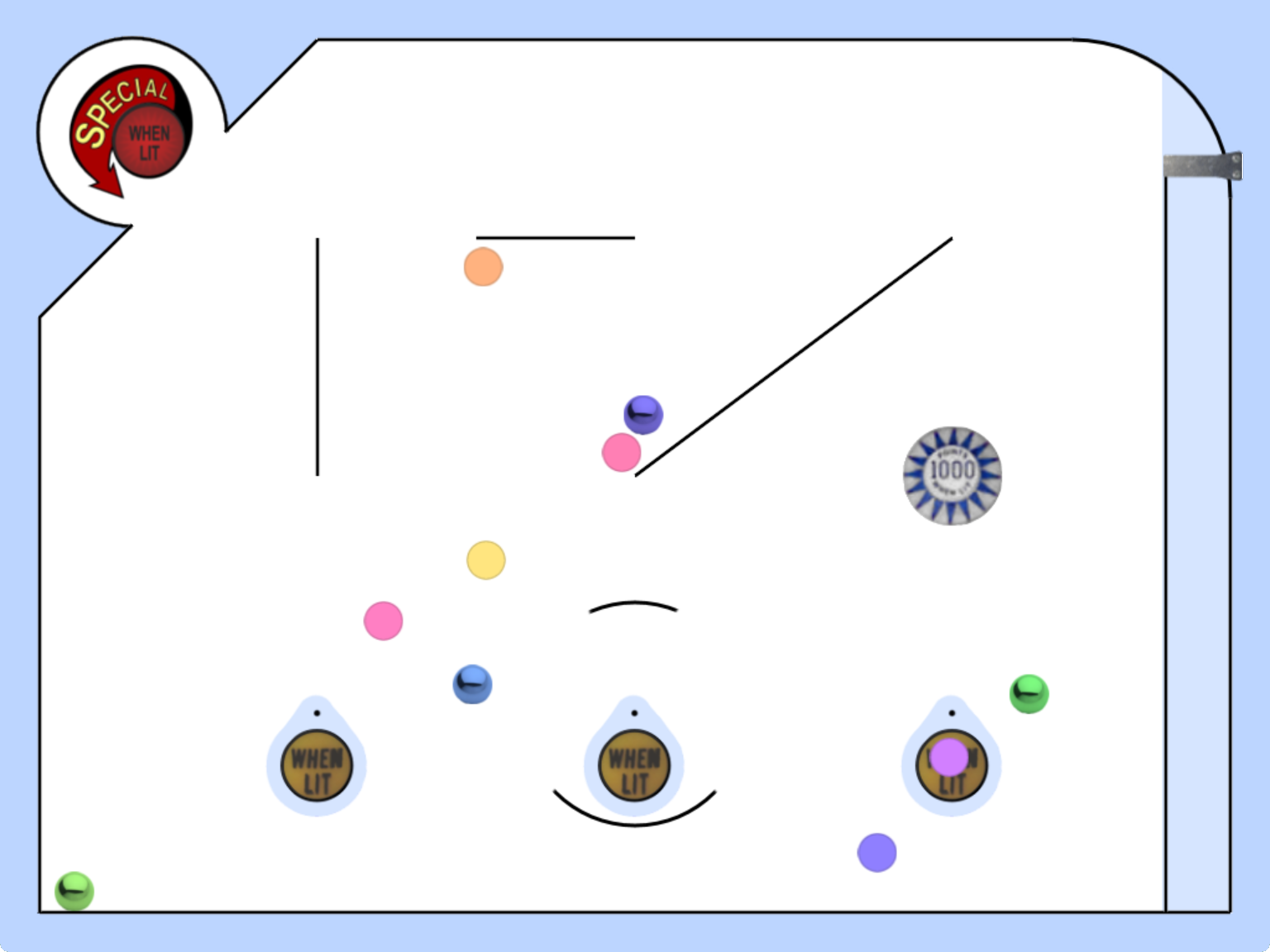
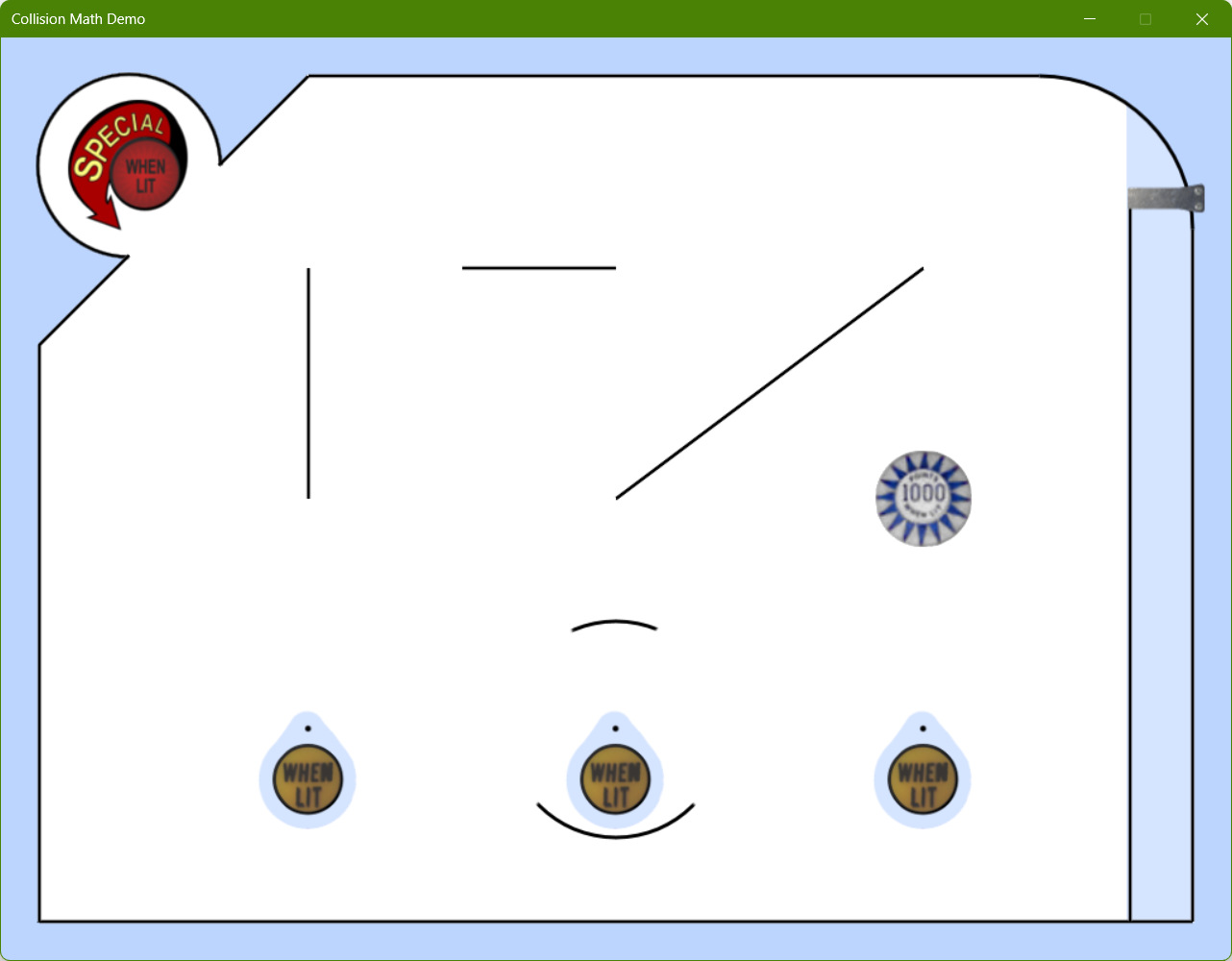
This is a collision detection and response toy intended to help you visualize what's going on in the in the Shapes Library by experimenting with various settings and measurements using a dialog box. Fig. 1 shows a screenshot of the toy before any balls are launched. Balls are launched from the bottom right corner and travel vertically before hitting the arc in the top right corner and entering the main play area. There are various shapes to collide with, including line segments, points, arcs, and circles. Two objects, the convex arc at the top left corner and the pinball bumper at the middle right, have an elasticity greater than 1.0f, that is, they increase the velocity of balls that collide with them. Some of the line segments and arcs have motion type Shapes::eMotion::Kinematic, although they start out with rotational velocity zero until you select the Rotate checkbox in the Other area of the dialog box controls, at which time they will have a constant but non-zero rotational velocity.
The remainder of this page is divided into five sections. Section 2 lists the controls and their corresponding actions, Section 3 tells you how to build it, Section 4 gives you a list of actions to take in the game to see some of its important features, Section 5 gives a breakdown of the code, Section 6 contains some programming problems, and Section 7 addresses the question "what next?".
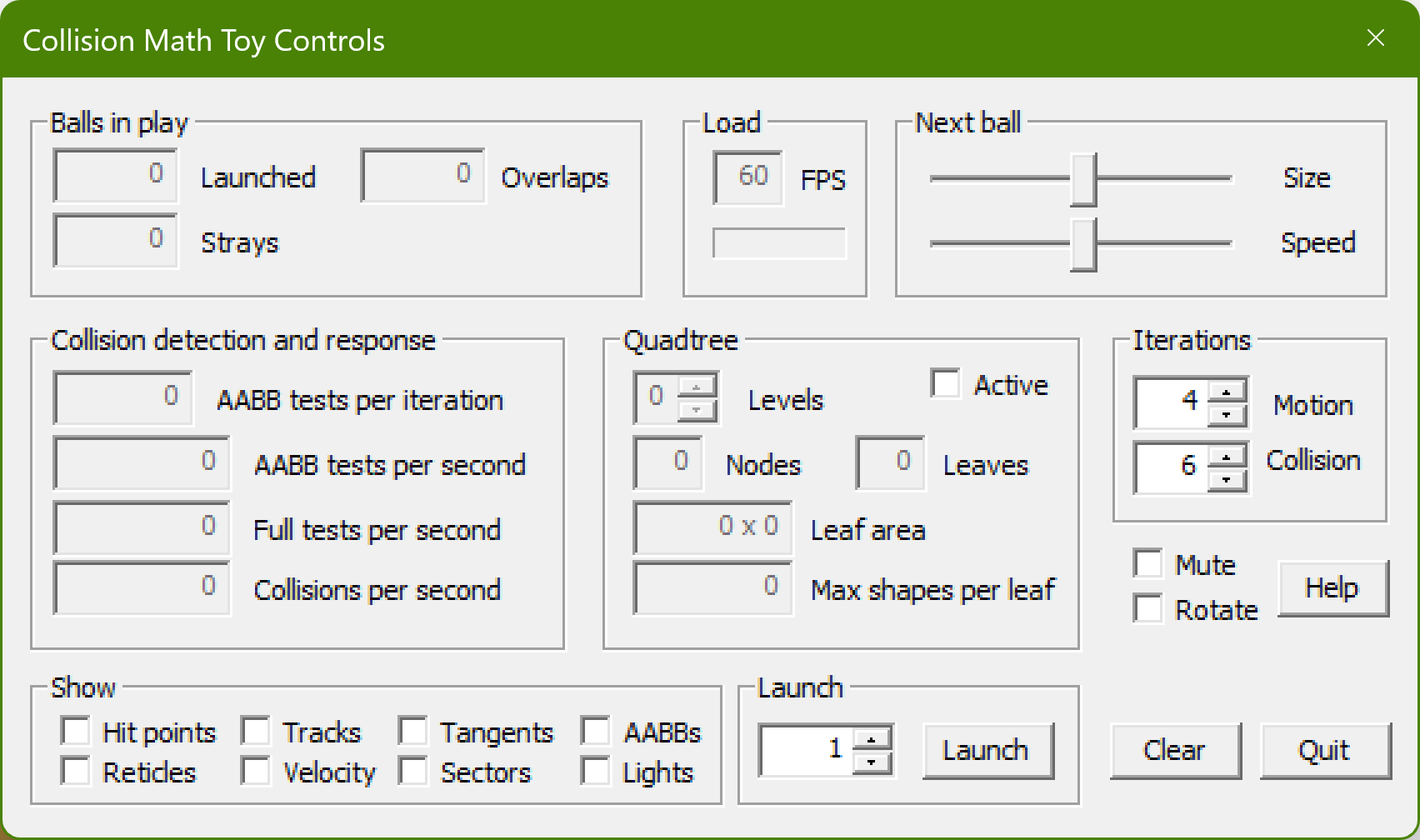
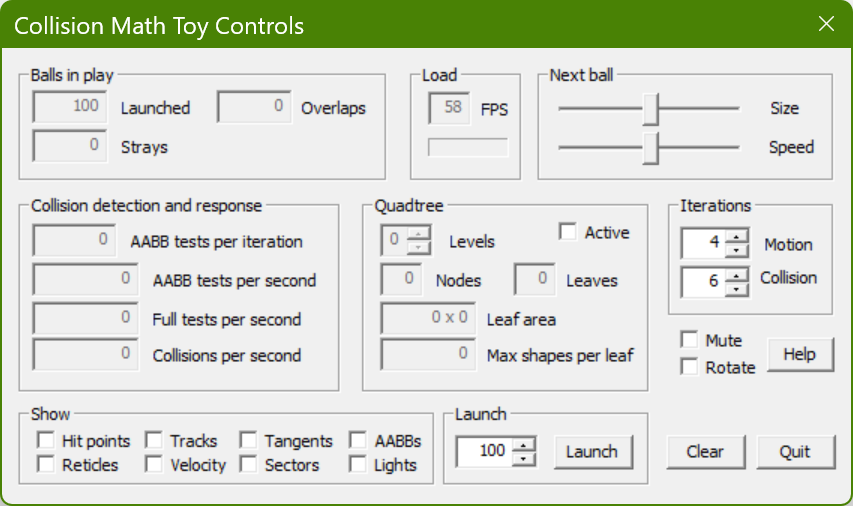
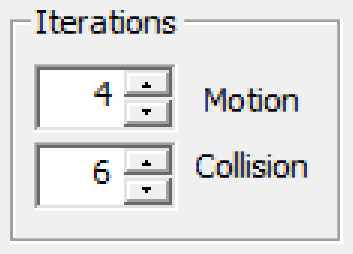
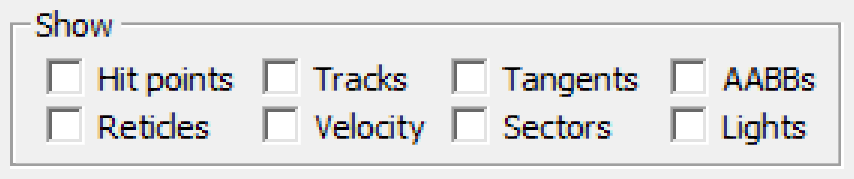
The Collision Math Toy is controlled by the dialog box shown in Fig. 2, which is divided up into regions as described below.
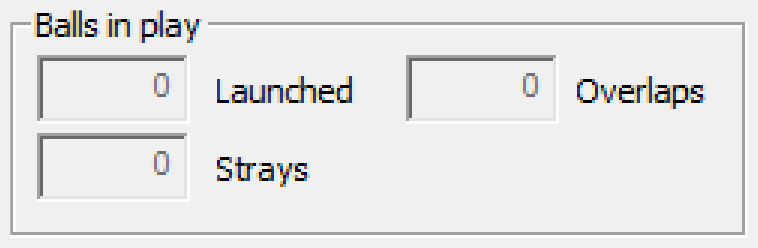
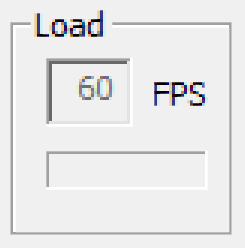
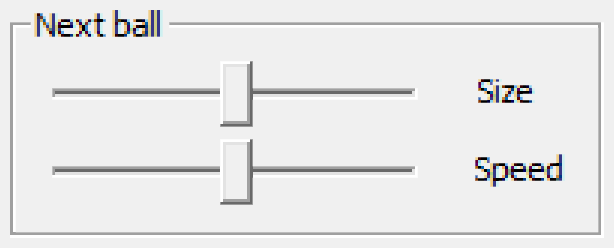
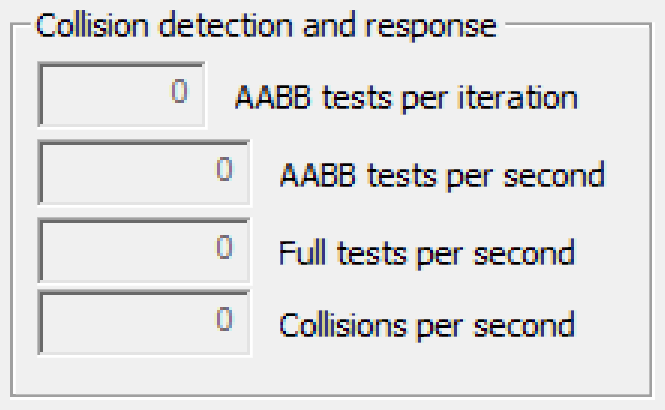
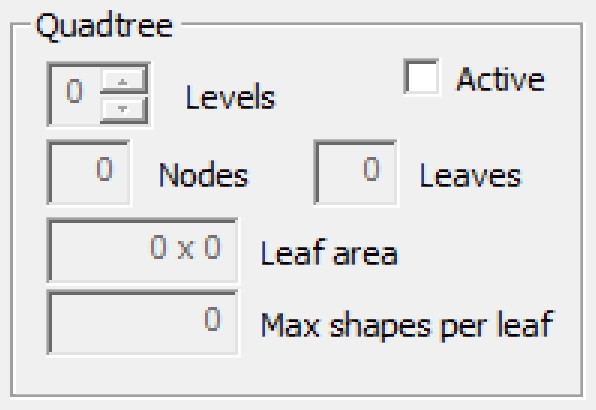
See Section 5.4 for more details on quadtrees.




This code uses SAGE and the Shapes Library. Make sure that you have followed the SAGE Installation Instructions and the Shapes Library Build Instructions. Navigate to the folder 3. Collision Math Toy in your copy of the sage-physics repository. Run checkenv.bat to verify that you have set the environment variables correctly. Open Collision Math Toy.sln with Visual Studio and build the Release configuration. The Release executable file Collision Math Toy.exe will appear. Alternatively, run Build.bat to build both Release and Debug configurations.
Use the dialog box controls described in Section 2 to explore collision detection and response of dynamic circles colliding with other shapes from the Shapes Library. It is important to keep in mind that the settings in this toy can be set to values that make bad things happen, in particular, balls may escape from the play area and balls may be co-located, that is, drawn on top of one another.
The most important thing in this project is to see how the code interacts with the Shapes Library. The high points of the code are the object class CObject covered in Section 5.1, the object manager class CObjectManager covered in Section 5.2, the gate class CGate covered in Section 5.3, and the quadtree class CQuadTree covered in Section 5.4.
Unlike the game object in The Pool End Game, this game object does not have member variable m_vPos for its position nor does it have m_vVel for its velocity. Instead it has a pointer to a shapes from the Shapes library,
Shapes::CShape* m_pShape = nullptr;
CObject gets the value of this pointer from its constructor. CObject is managed by CObjectManager, which is the subject of the next subsection.
The object manager's job is, of course, to manage the objects. The most interesting functions are CObjectManager::Move covered in Section 5.2.1, CObjectManager::BroadPhase covered in Section 5.2.2, and CObjectManager::NarrowPhase covered in Section 5.2.3.
CObjectManager::Move iterates through the dynamic and kinematic shapes pointed to by its objects, calling Shapes::CShape::move or in most cases, the appropriate function derived from it. More correctly, CObjectManager::Move does this in a loop CCommon::m_nMIterations times (the M stands for motion iterations). This value can be modifed in real time using the Iterations region of the Controls dialog box. Why would you have more than one motion iteration? It is so that the shapes move less far in each motion so that tunneling is mitigated or avoided. How is that handled in our code? When the number of iterations is changed in the dialog box, a callback function CDialogBox::DlgProc in DialogBox.cpp changes the value of Shapes::CShapeCommon::m_fTimeStep. This value then gets used in Shapes::CDynamicCircle::move and Shapes::CShape::move to scale back translation and rotation, respectively.
Broad phase collision detection and response is a function that detects and computes responses for collisions with all game objects. Broad phase will call narrow phase collision detection and response, which is a function that detects and computes responses for collisions between two game objects. You might be tempted to use the following naive implementation of a broad phase collision detection and response function which calls NarrowPhase once for each pair of shapes in an std::vector of pointers to CShape.
void CObjectManager::BroadPhase(std::vector<CShape*> v){
  for(auto i: v)
    for(auto j: v)
      if(i != j)
        NarrowPhase(*i, *j);
} //BroadPhase
We call this function naive because NarrowPhase is actually called twice for each pair of CShapes. Instead, we change the second for loop to iterate through the shapes following the one chosen in the first for loop. Let's call this brute force broad phase, since it calls narrow phase for each and every unordered pair of objects, even though some may be ridiculously far apart.
void CObjectManager::BroadPhase(std::vector<CShape*> v){
  for(auto i=v.begin(); i!=v.end(); i++)
    for(auto j=next(i, 1); j!=v.end(); j++)
      NarrowPhase(*i, *j);
} //BroadPhase
If there are \(n\) shapes in the parameter v, then the number of calls to NarrowPhase is:
\[ \sum_{i=1}^{n - 1} \sum_{j=i+1}^n 1 = \sum_{i=1}^{n - 1} (n-i) = \sum_{i=1}^{n - 1} n - \sum_{i=1}^{n - 1} i = n(n-1) - n(n-1)/2 = n(n-1)/2 = \Theta (n^2). \]
You can see that we have halved the number of calls to NarrowPhase which is a pretty good speed-up in practice. However, \(\Theta(n^2)\) is pretty bad when you consider that there can be only \(O(n)\) collisions between \(n\) bounding spheres at any one time (see Kissing Numbers). Fortunately, there are many space partitioning data structures and algorithms that can be used to speed up broad phase collision detection. A quadtree (see Section 5.4) is one of them.
More correctly, CObjectManager::BroadPhase does this in a loop CCommon::m_nCIterations times (the C stands for collision iterations). This value can be modifed in real time using the Iterations region of the Controls dialog box. The code therefore looks more similar to this:
void CObjectManager::BroadPhase(std::vector<CShape*> v){
  for(int i=0; i<m_nCIterations; i++)
    for(auto i=v.begin(); i!=v.end(); i++)
      for(auto j=next(i, 1); j!=v.end(); j++)
        NarrowPhase(*i, *j);
} //BroadPhase
Notice that this means that CObjectManager::NarrowPhase is called m_nMIterations*m_nCIterations per frame for each unordered pair of shapes (see also Section 5.2.1).
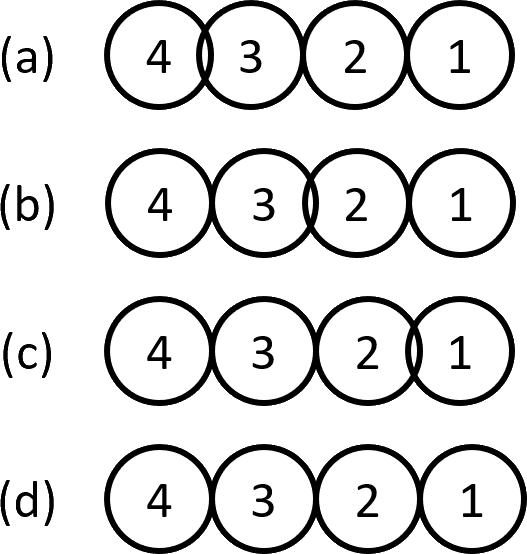
The reason for doing more than one collision iteration per frame is because collision detection and response may move a shape in such a way that it now collides with an object that it formerly didn't. For example, consider a 2D simulation of Newton's Cradle with four circles numbered 1 through 4 that touch in a straight line. Suppose that circle 4 has been moved so that it overlaps circle 3, as shown in Fig. 16. Now suppose that the object manager has these shapes in ascending order, that is, Shape 1, then 2, then 3, then 4. Brute force broad phase collision detection and response will call narrow phase for the following unordered pairs of circles. However, only the last one (in red) will detect a collision.
(1, 2), (1,3), (1, 4), (2, 3), (2, 4), (3, 4)
The response will be to move circle 3 to the right where it overlaps circle 2 as shown in Fig. 16. This won't be caught until the next iteration.
(1, 2), (1,3), (1, 4), (2, 3), (2, 4), (3, 4)
The response will be to move circle 2 to the right where it overlaps circle 1 as shown in Fig. 16. Again, this won't be caught until the next iteration.
(1, 2), (1,3), (1, 4), (2, 3), (2, 4), (3, 4)
The response will be to move circle 1 to the right as shown in Fig. 16.
Of course, you can argue that these collisions can usually be safely postponed until the next frame, but then you risk instability. It's best to handle as many as possible in the current frame. You can also argue that it is a contrived example that would rarely come up in practice. Nonetheless, you should probably use 4 to 6 collision iterations just to be on the safe side.
CObjectManager::NarrowPhase performs narrow phase collision detection and response, and takes as parameters pointers to two shapes, the second of which is a dynamic circle Shapes::CDynamicCircle (since other collisions haven't been implemented yet). The necessary alterations to the simplified brute force broad phase have been made in the code. A fast rejection is then performed using AABBs, Shapes::CShape::CAabb2D, because if shapes' AABBs don't overlap, then the shapes do not overlap. This saves us having to do any more wasted computation on this non-collision. CObjectManager::NarrowPhase uses Shapes::CShape::CollisionDetected to fill in a contact descriptor Shapes::CShape::CContactDesc that is then passed to Shapes::CCircle::CollisionResponse, which performs collision response for both of the shapes.
If CObjectManager::NarrowPhase detects a collision, then it is responsible for collision sounds and particles. However, since it is given as parameters only pointers to shapes in the Shapes Library, it needs a way to find out which instances of CObject correspond to the colliding shapes. We use the user pointer in Shapes::CShape for this purpose. CObjectManager::MakeShape makes a shape, given a shape descriptor and an object descriptor, creates a shape and an object. It makes the object's shape pointer CObject::m_pShape point to the shape, and makes the shape's user pointer point to the object by calling Shapes::CShape::SetUserPtr. Functions such as CObjectManager::NarrowPhase that have only a pointer pShape to an instance of Shapes::CShape can get a pointer to the object that it belongs to as follows:
CObject* pObj = (CObject*)(pCirc->GetUserPtr());
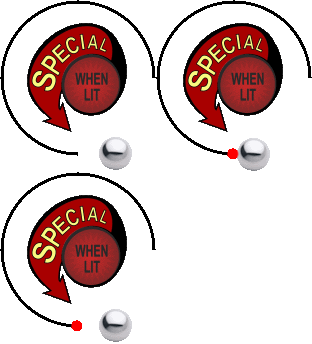
CObjectManager::NarrowPhase uses this to, for example, change the sprite of an object involved in a collision from an unlit sprite to a lit sprite as shown in Fig. 12.
A gate (see Fig. 17) allows balls to pass in one direction only, and are reflected back otherwise.

Gates are implemented as an instance of CGate. CGate has a pointer m_pLineSeg to an instance of Shapes::CLineSeg and has a function CGate::NarrowPhase to do narrow-phase collision detection and response allowing balls to pass only in the direction of the normal to the line segment.
Quadtrees are a data structure used to speed up broad-phase collision detection and response. This section is divided into 5 subsections. Section 5.4.1 gives the formal definition of a quadtree as an abstract data type. Section 5.4.2 lists some useful facts about quadtrees. Section 5.4.3 describes the implementation of the quadtree abstract data type as the quadtree data structure. Section 5.4.4 describes how quadtrees are used for collision detection. Section 5.4.5 contains an analysis of the running time of broad-phase collision detection using quadtrees compared to he brute-force method.
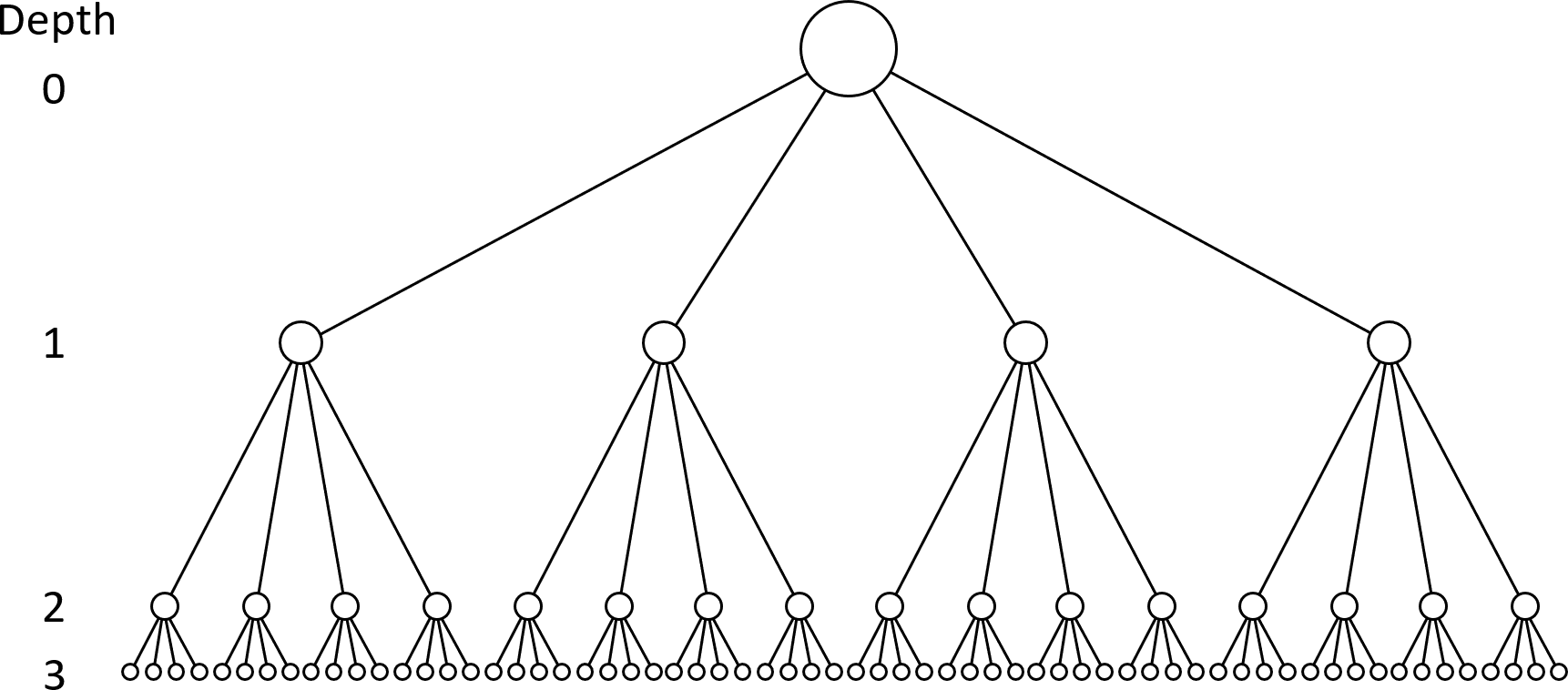
A quadtree is a full 4-ary tree in which each node represents an AABB covering part of the game world. That is, it is a tree in which every non-leaf node has exactly 4 children and every leaf is at exactly depth \(d\) from the root, where the depth of a node is the minimum number of edges that must be traversed from the node to the root. For example, Fig. 18 shows the depth of the nodes at each level. The depth of a quadtree is the depth of its leaves, which is 3 in Fig. 18.
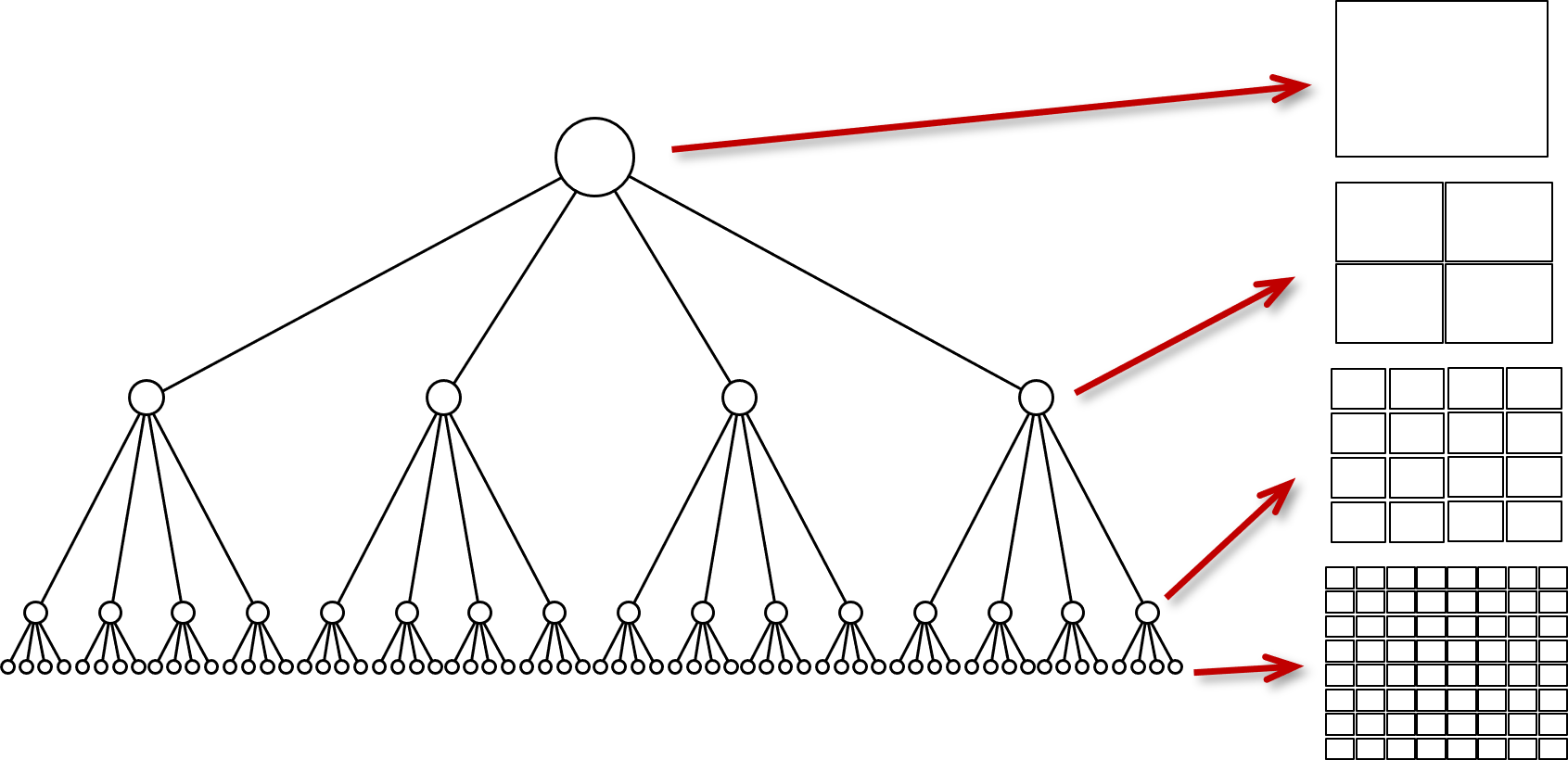
The root of a quadtree contains an AABB that contains the whole of the game world. The 4 children of a node subdivide the AABBs of their parent into 4 equal quadrants. For example, Fig. 19 shows the AABBs stored at the nodes of each level of the quadtree.
The number of nodes in a quadtree of depth \(d\) is
\[ \sum_{i=0}^d 4^i = \frac{4^{d+1}-1}{3}. \]
For example, the number of nodes in the quadtree shown in Fig. 18 is (summing by level) \(1 + 4 + 16 + 64 = 85\) and
\[ \sum_{i=0}^3 4^i = \frac{4^{4}-1}{3} = 255/3 = 85. \]
The number of leaves in a quadtree of depth \(d\) is \(4^d\). For example, the number of leaves in the quadtree shown in Fig. 18 is \(4^3 = 64\).
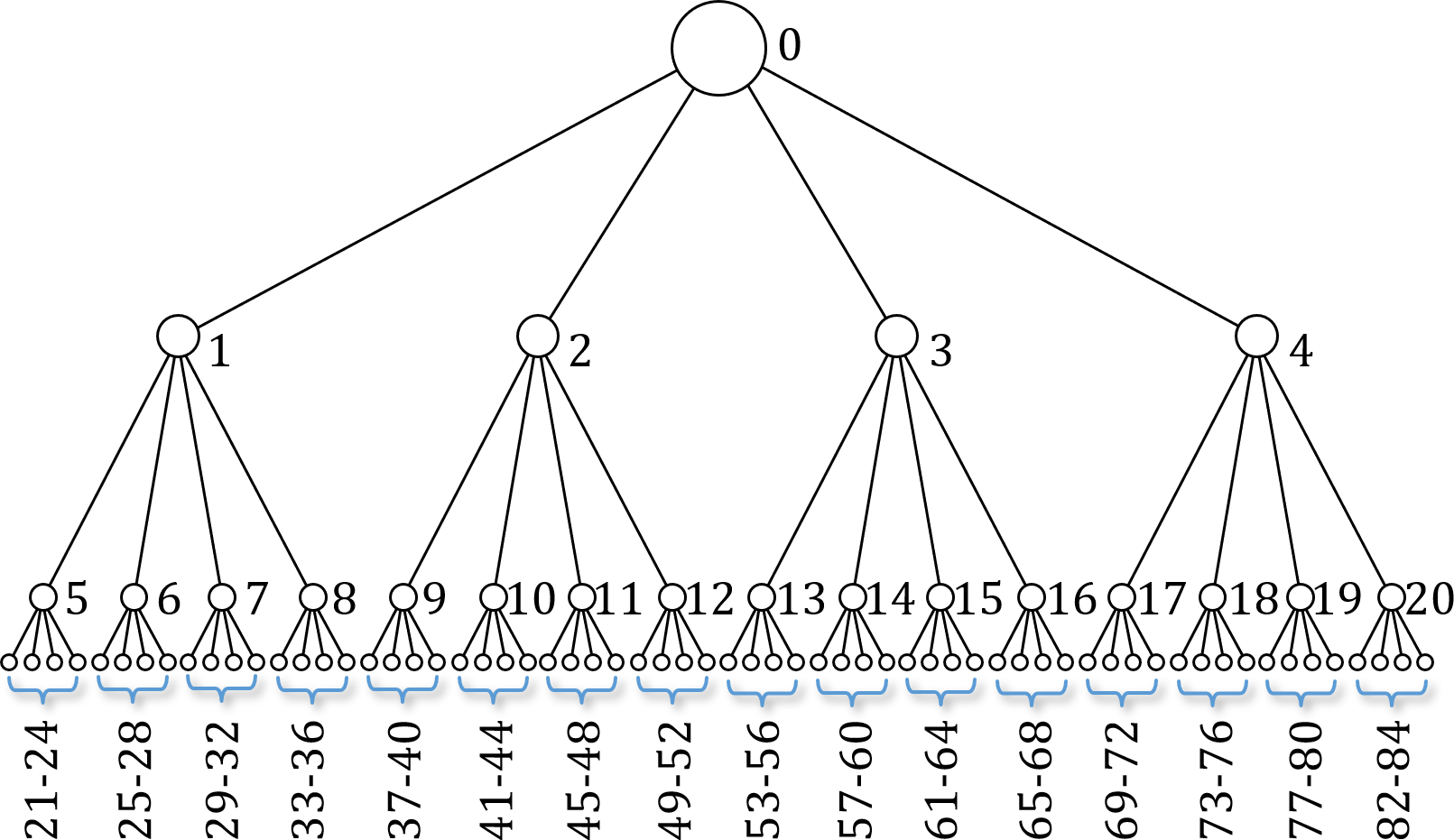
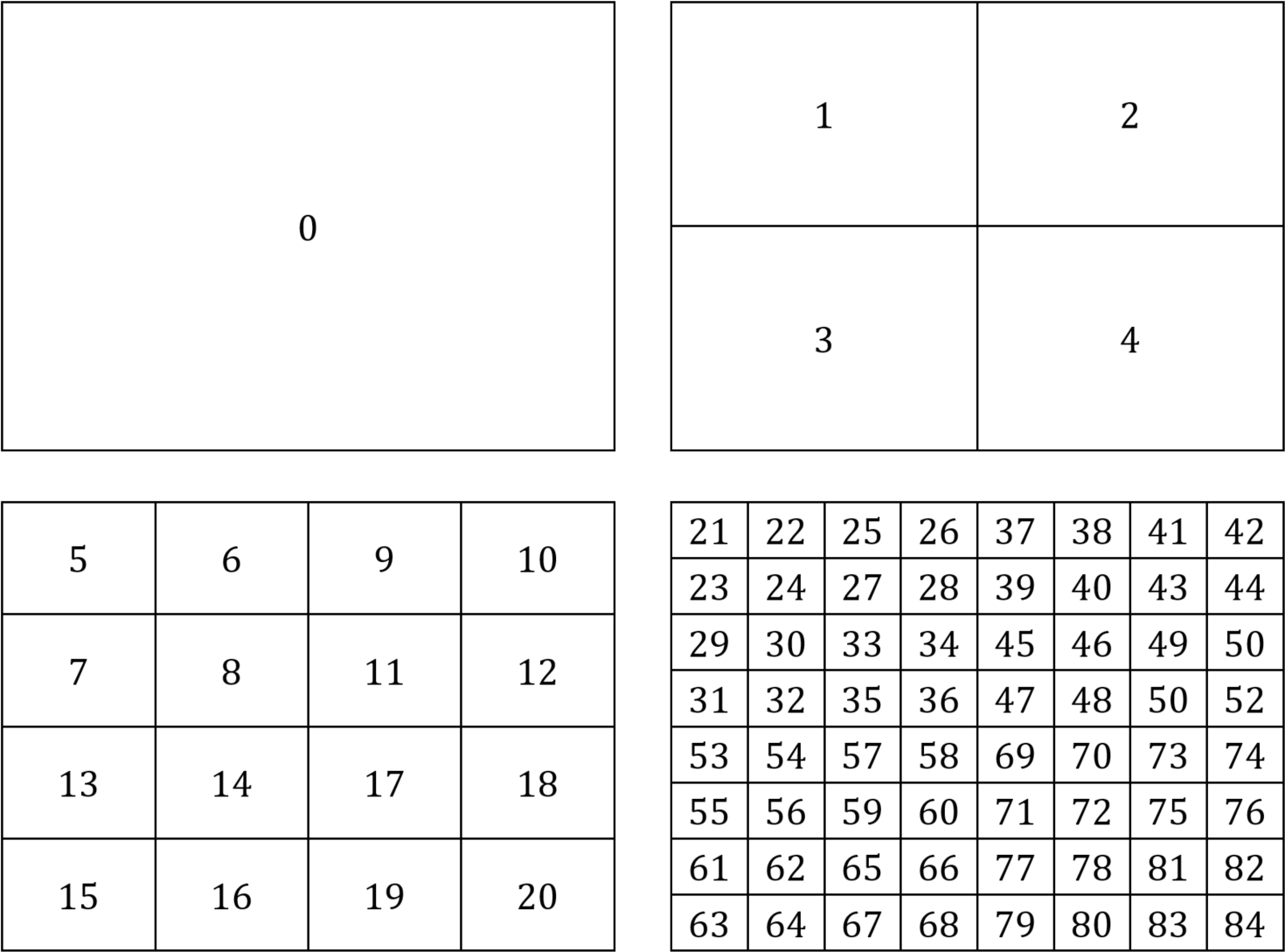
We can store an \(n\)-node quadtree in an array \(A[n]\) as follows. The root node is stored at \(A[0]\). The children of the node in \(A[i]\) are stored in nodes \(A[4i+1]\), \(A[4i+2]\), \(A[4i+3]\), and \(A[4i+4]\). The parent of the node in \(A[i]\) is in node \(A[\lfloor (i-1)/4 \rfloor]\). Fig. 20 shows the indices into \(A\) for the nodes of a depth 3, 85-node quadtree. Fig. 21 shows the AABBs labeled with the indices into \(A\) for the nodes of a depth 3, 85-node quadtree.
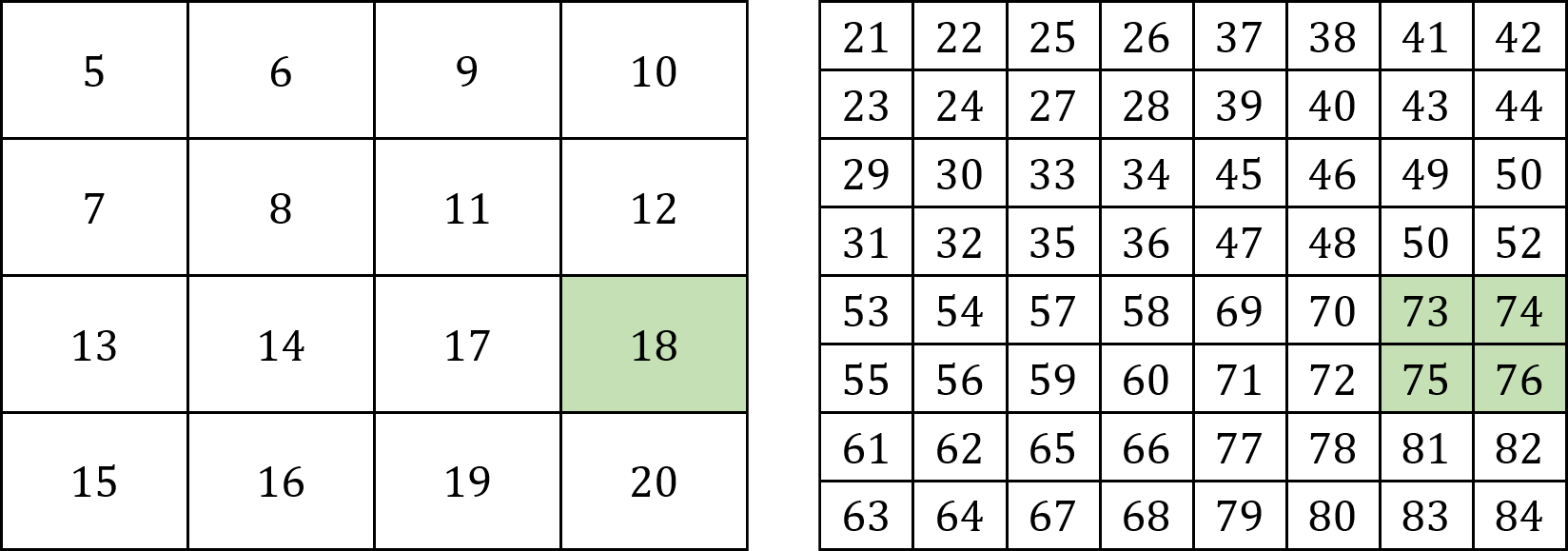
For example, since \(4 \times 18 = 72\), the children of the node at \(A[18]\) are at nodes \(A[73]\), \(A[74]\), \(A[75]\), and \(A[76]\), and since \(\lfloor 72/4\rfloor = \lfloor 73/4\rfloor = \lfloor 74/4\rfloor = \lfloor 75/4\rfloor = 18\), the parent of nodes \(A[73]\), \(A[74]\), \(A[75]\), and \(A[76]\) is in \(A[18]\) (see Fig. 22).
As mentioned in Section 2.8, selecting Show AABBs from the dialog box will draw the leaf node areas of the AABB in magenta as shown in Fig. 23.

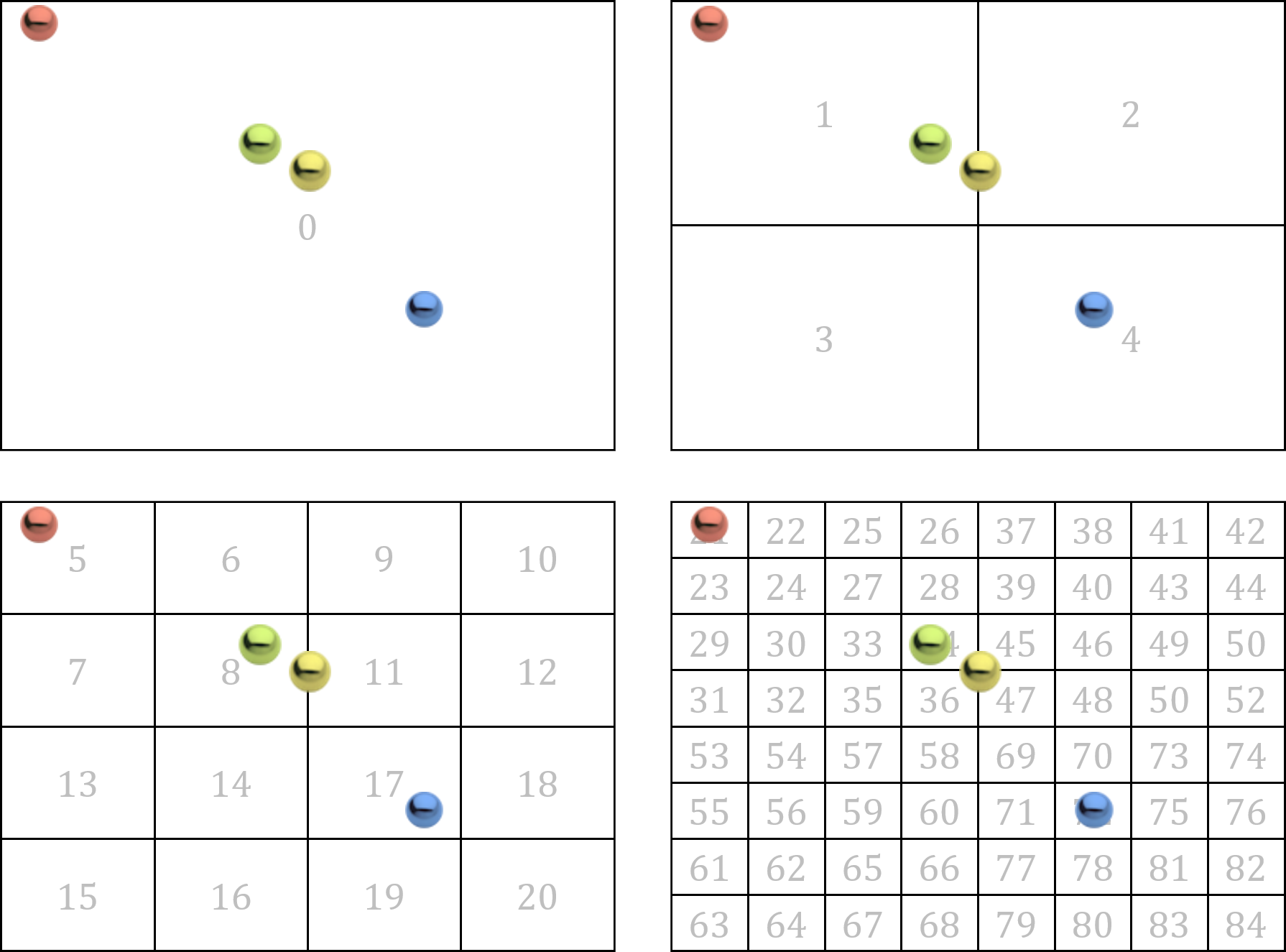
Consider the areas covered by the nodes of the quadtree of depth 3 shown in Fig. 24 with four colored balls drawn at their places in the game world.
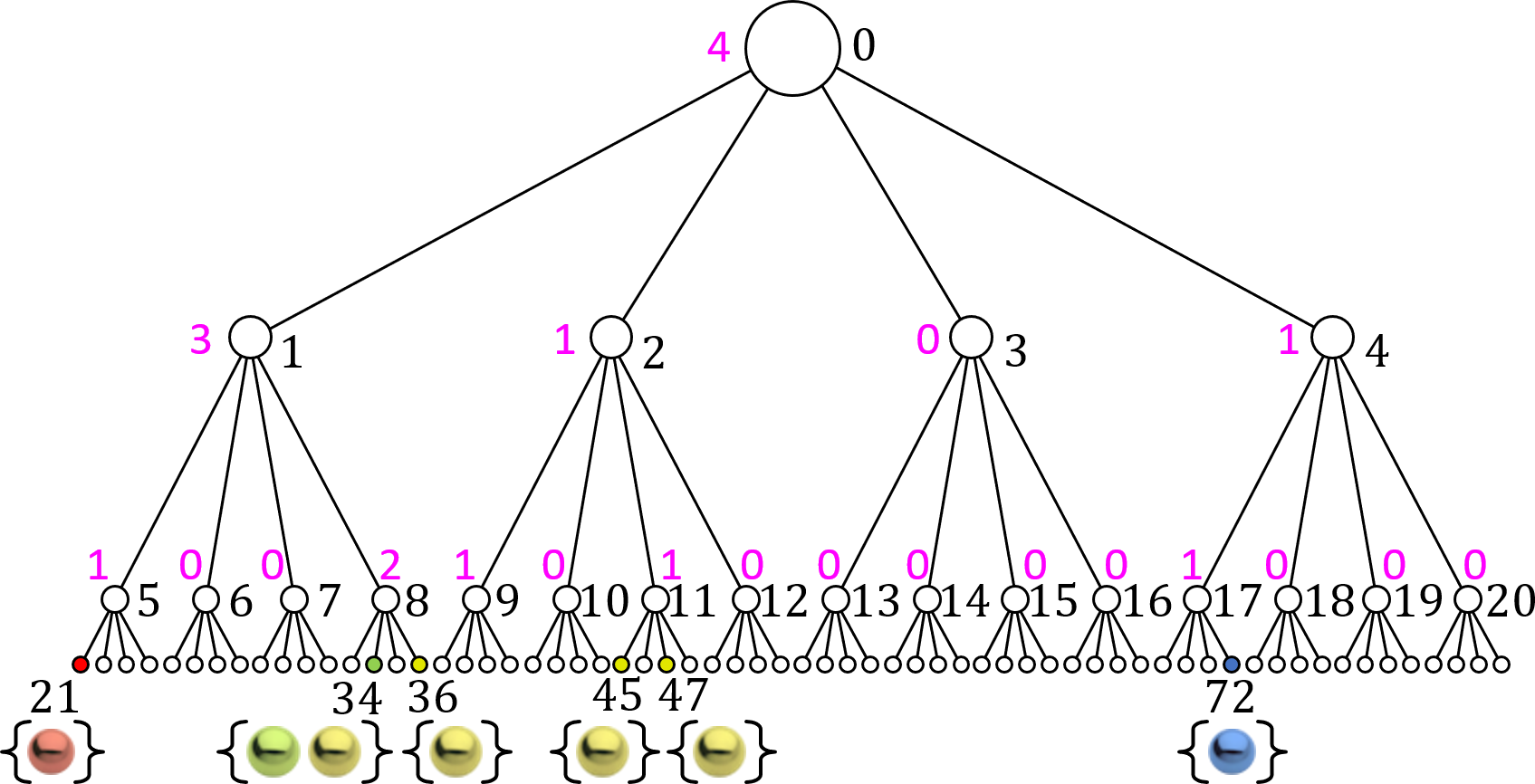
Suppose our game world has dimensions \(N \times N\) and has \(n\) shapes in it. We begin by building the quadtree structure of depth \(\lceil \log_4 N\rceil\). This takes time \(O(N)\). On each broad phase iteration, we delete the shapes in the quadtree and reinsert them at their new positions. This takes \( \log N\) time per shape, which gives total time of \(O(n \log N)\). If there are \(m\) non-empty leaves each of which has at most \(k\) shapes in it, then each iteration of broad phase makes at most \(O(mk^2)\) calls to narrow phase. Assume that each call to narrow phase takes time \(O(1)\). The running time of broad phase is therefore \(O(m \log N + mk^2)\). If we assume that on average shapes are somewhst widely distributed, that is, \(m = \theta(n)\) and \(k = O(1)\), then
\[ O(m \log N + mk^2) = O(n \log N + n) = O(n \log N). \]
If we take \(N\) to be constant for the duration of gameplay and gradually increase the number of shapes \(n\) over time, then the asymptotic time complexity will be \(O(n)\), which is much better than the bruteforcebroadphase brute force \(\Theta ( n^2 )\) broad phase collision detection and response algorithm. Most importantly though, is this true in practice for reasonable values of \(n\), \(N\), \(m\), and \(k\)?
Suppose we measure the number of AABB tests performed by the brute force method and by quadtrees. Each measurement records 60 seconds of motion, gathering data 60 times per second. The quadtree has 4 levels, and each leaf covers 60 × 44 pixels. The moving circles have a diameter of 42 pixels, so at most \(k=4\) balls can be in a leaf.
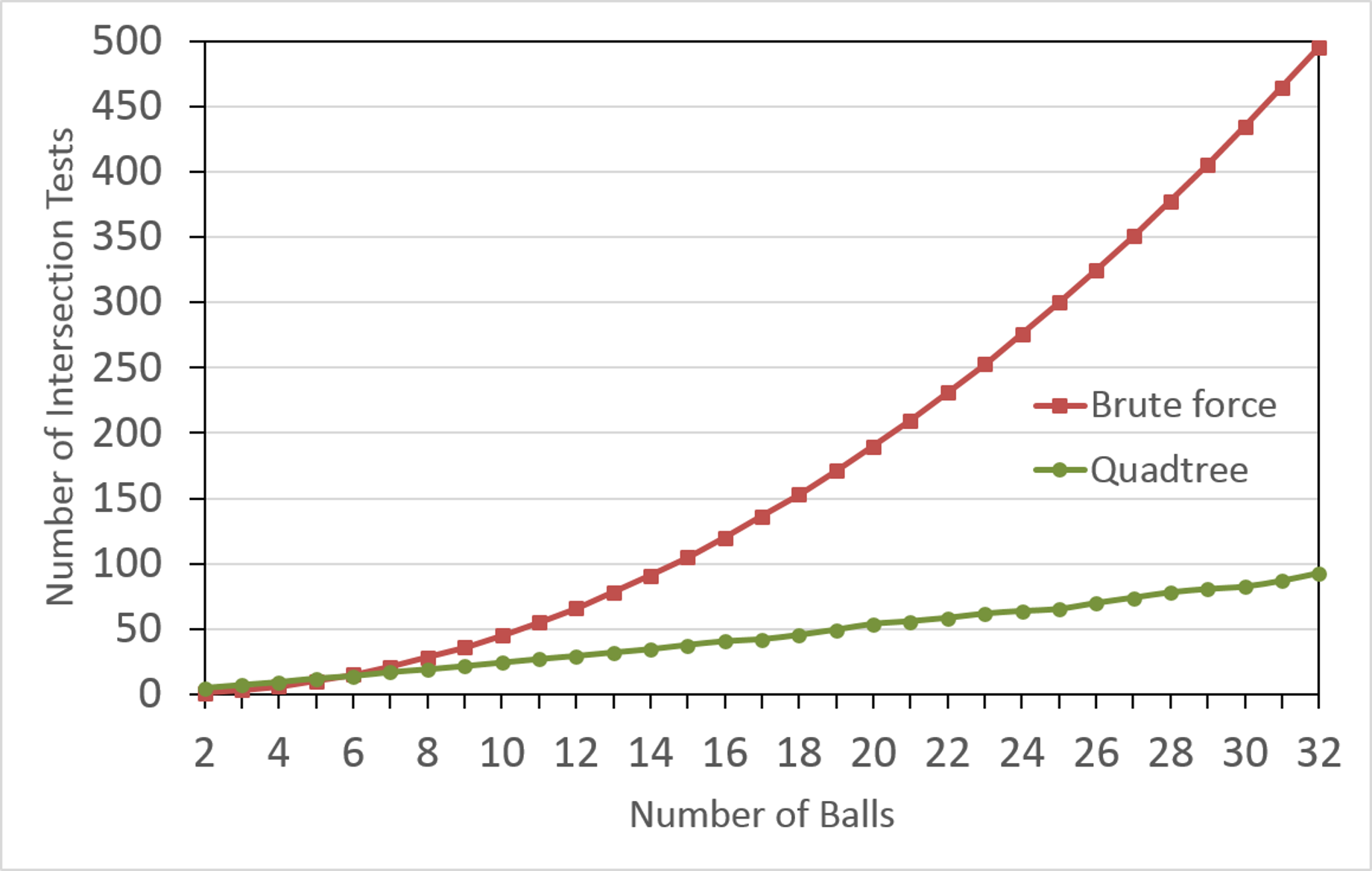
Fig. 26 shows the number of AABB intersection tests used during broad phase collision detection and response for \(2 \leq n \leq 32\) balls, with the brute force figures in red and the quadtree figures in green. Note that the quadtree method very quickly becomes more efficient than the brute force method with quadtrees winning by a factor of 5 for \(n=32\) balls.
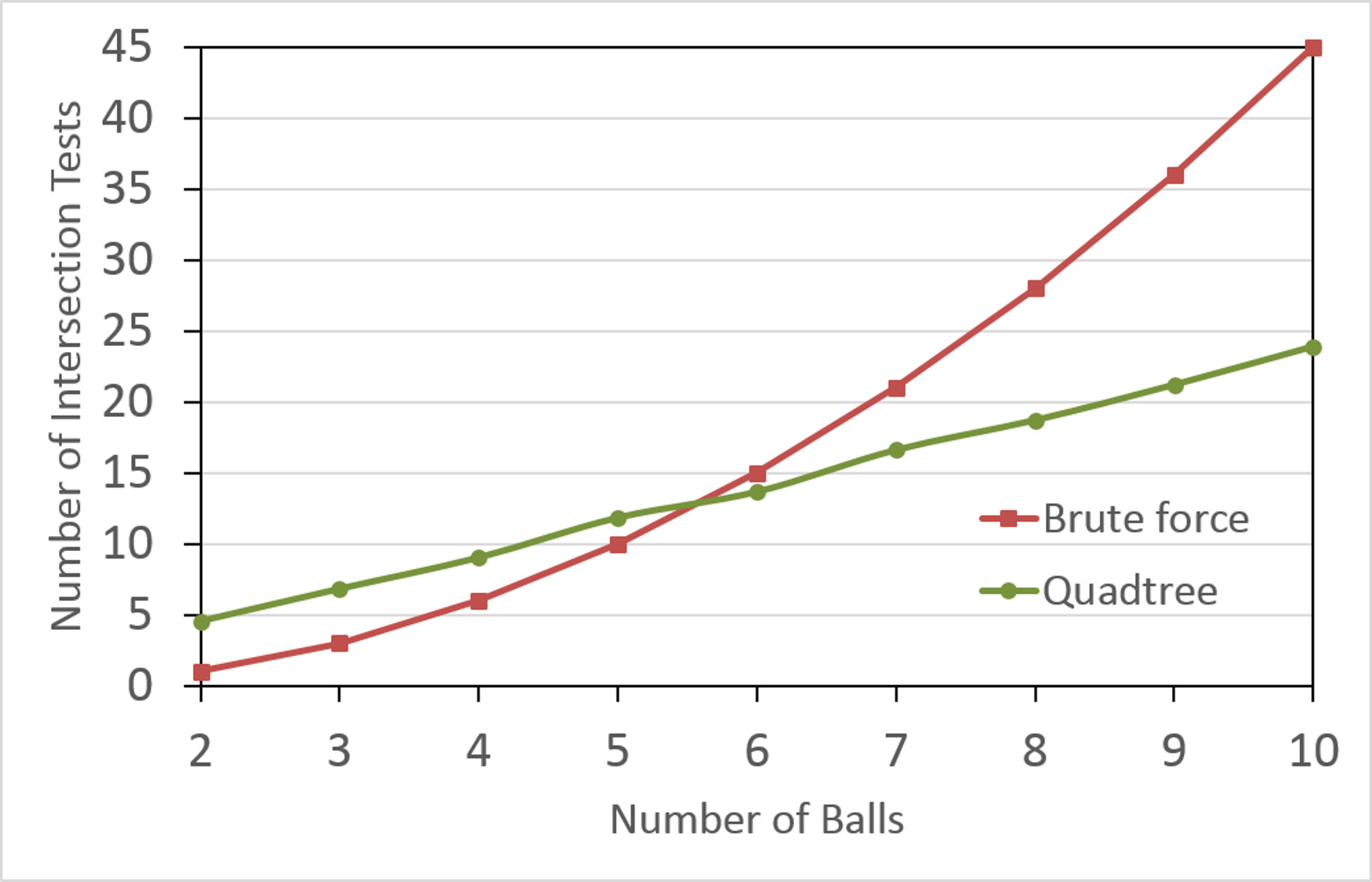
Since the far left of Fig. 26 is hard to read, it is reasonable to ask where the two graphs cross, that is, for which value of \(n\) does quadtrees become more efficient. Fig. 27 shows the results for up to 10 balls in more detail, from which we can see that quadtrees become more efficient for 6 balls or more.
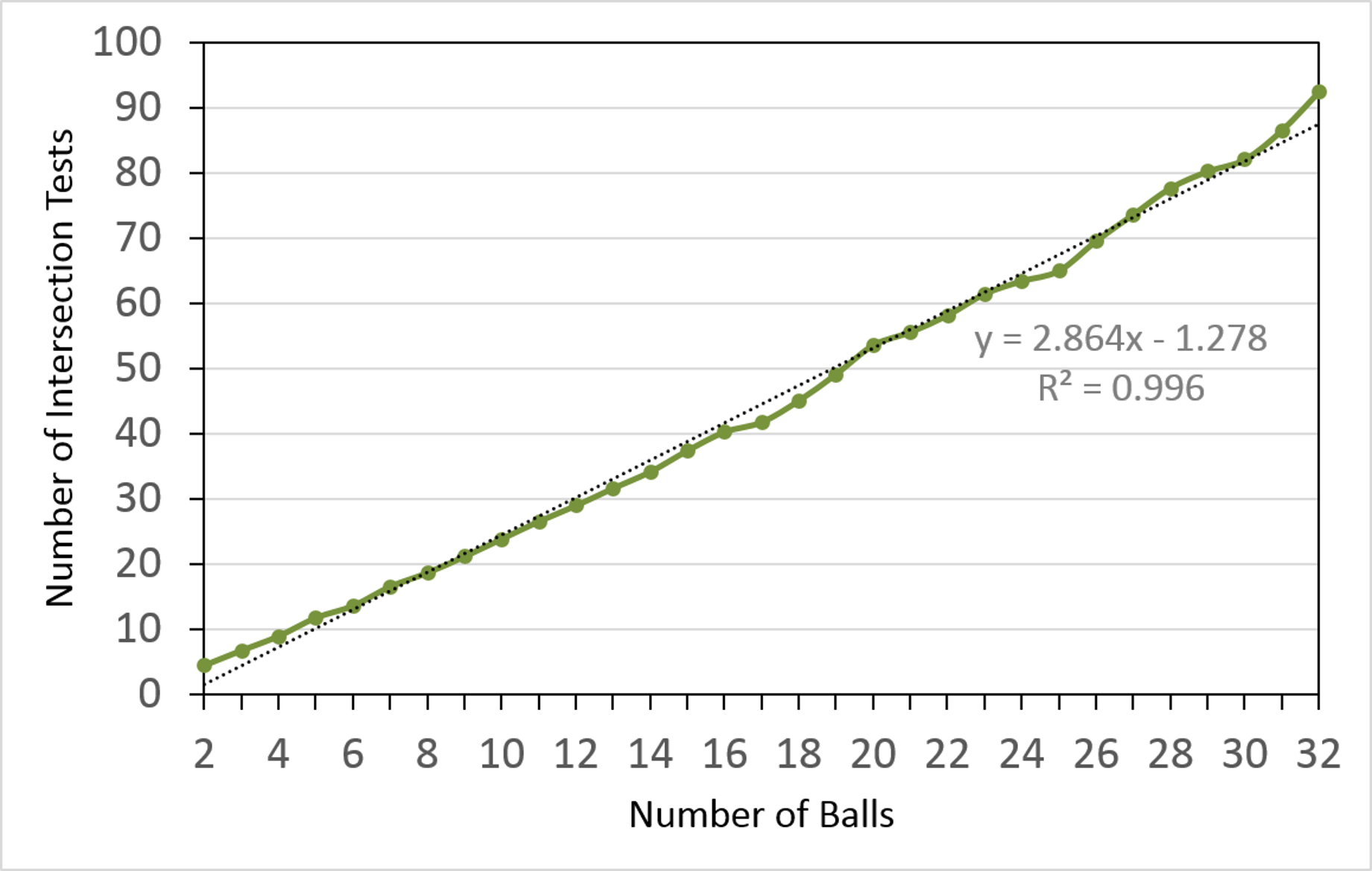
We made the claim above that for reasonable values of \(N\), \(k\), and \(m\), quadtree collision detection and response runs in time \(O(n)\). Fig. 28 shows the result of curve-fitting our results to a linear function using Microsoft Excel. It reports that the number of AABB intersection tests is slightly less than 3 times the number of balls with certainty \(R^2 = 0.996\), which is pretty close to linear in \(n\).
For the following problems, copy the folder 3. Collision Math Toy from your copy of the sage-physics repository to some place convenient (for example, the Desktop or your Documents folder) and work there.
Collision Math Toy was designed so that there will almost always be balls in motion. The following changes will make sure that they always will eventually come to a halt. First, we give the launched balls some Z-axis friction by adding the lineCGame::Launch in Game.cpp after the line that sets d.m_fElasticity. Next, in function CObjectManager::MakeWorldEdges in ObjectManager.cpp, find the line700.0f to 0.9f. Similarly, in the line1.0f to 0.9f. Finally, in function CObjectManager::MakeShapes, find the line500.0f to 0.9f. Towards the end of the function you will find a line700.0f to 0.9f as follows.CObjectObject.h, add the following public writer and reader functions to CObject to enable other entities to access the sleep flag m_bSleep.Object.cpp as follows.CObjectManagerCObjectManager::Move and CObjectManager::BroadPhase.CObjectManager::MoveObjectManager.cpp, add the following code to CObjectManager::Move after the quadtree is updated and before the number of out of bounds balls is counted.bGoToSleep to true iff the dynamic circle's velocity is very small, and if so, reduces the velocity to the zero vector. The if-statement is defensive programming since pObj will never be nullptr unless some far-reaching bug such as a buffer over-run makes it so. The body of the if-statement (which is always executed) sets the current objects's sleep flag if necessary, and changes its sprite from the usual eSprite::Ball to eSprite::Circle when sleeping. For example, in Fig. 29 you can see ten balls, six of which are sleeping (the colored circles) and four of which are not (the green and blue ball-bearings).CObjectManager::BroadPhaseCObjectManager::BroadPhase has two nested for-loops, the first repeating for the number of broad-phase iterations m_nCIterations and the second for each dynamic shape. After the first line of the body of the nested for-loop declare an object pointer pObj1 and make it point to the first object (whose shape is a dynamic circle), then declare a boolean variable bObj1Sleep and set it to true if that object is asleep:if-statement as follows.if-statement as follows. Also, wake the object if a collision is detected.Next, take a look at the Pinball Game.
 1.12.0