 |
Box2D Cannon Game
Game Physics with a 2D Physics Engine
|
|
Box2D Cannon Game
Game Physics with a 2D Physics Engine
|
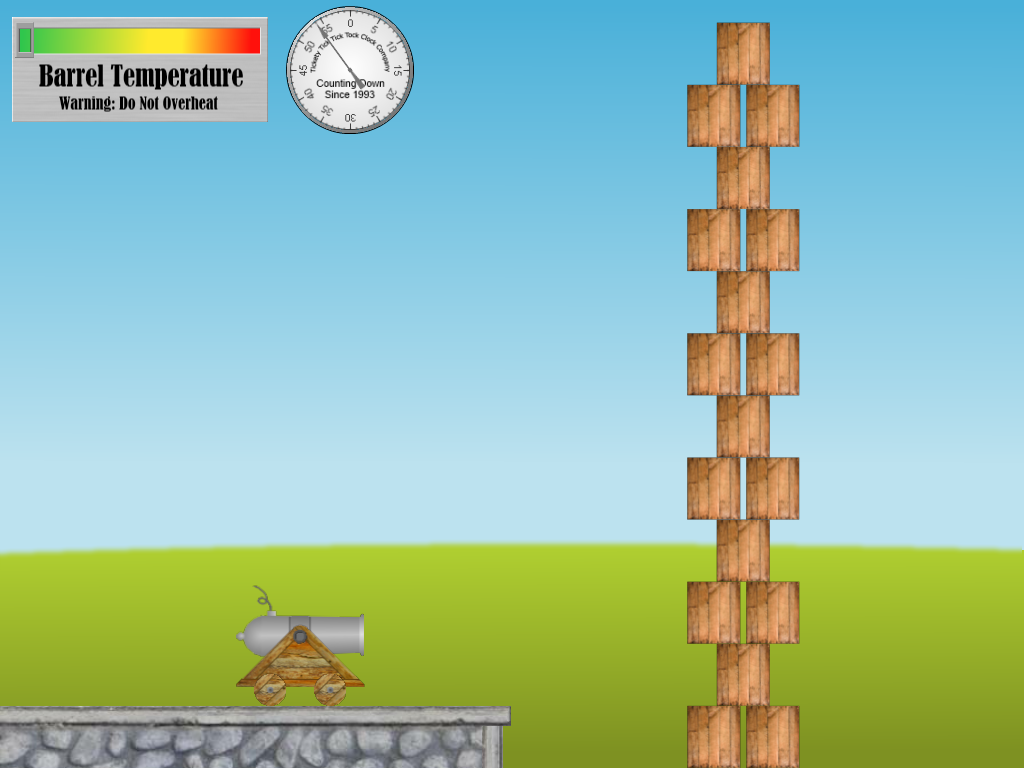
The Cannon Game demonstrates how to make a simple minigame using Box2D building on concepts from the Box2D Bouncy Things Toy and the Box2D Joint Toy. It consists of a cannon resting on a stone wall, a stack of crates, and a heads-up display consisting of a temperature gauge and a stopwatch, as shown in Fig. 1.
The remainder of this page is divided into five sections. Section 2 lists the controls and their corresponding actions, Section 3 tells you how to build it, Section 4 gives you a list of actions to take in the game to see some of its important features, Section 5 gives a breakdown of the code, Section 6 contains some programming problems, and Section 7 addresses the question "what next?".
| Help (this document) | |
| Toggle draw mode from "sprites only", to "sprites and lines", to "lines only" | |
| Restart when over | |
| Fire cannon | |
| Rotate cannon barrel up while key is depressed | |
| Rotate cannon barrel down while key is depressed | |
| Start cannon moving left | |
| Start cannon moving right | |
| Stop cannon | |
| Save screenshot to a file | |
| Quit game and close the window |
This code uses SAGE and Box2D. Make sure that you have followed the SAGE Installation Instructions and the Box2D Installation Instructions. Navigate to the folder 9. Box2D Cannon Game in your copy of the sage-physics repository. Run checkenv.bat to verify that you have set the environment variables correctly. Open Box2D Cannon Game.sln with Visual Studio and build the Release configuration. Alternatively, run Build.bat to build both Release and Debug configurations.
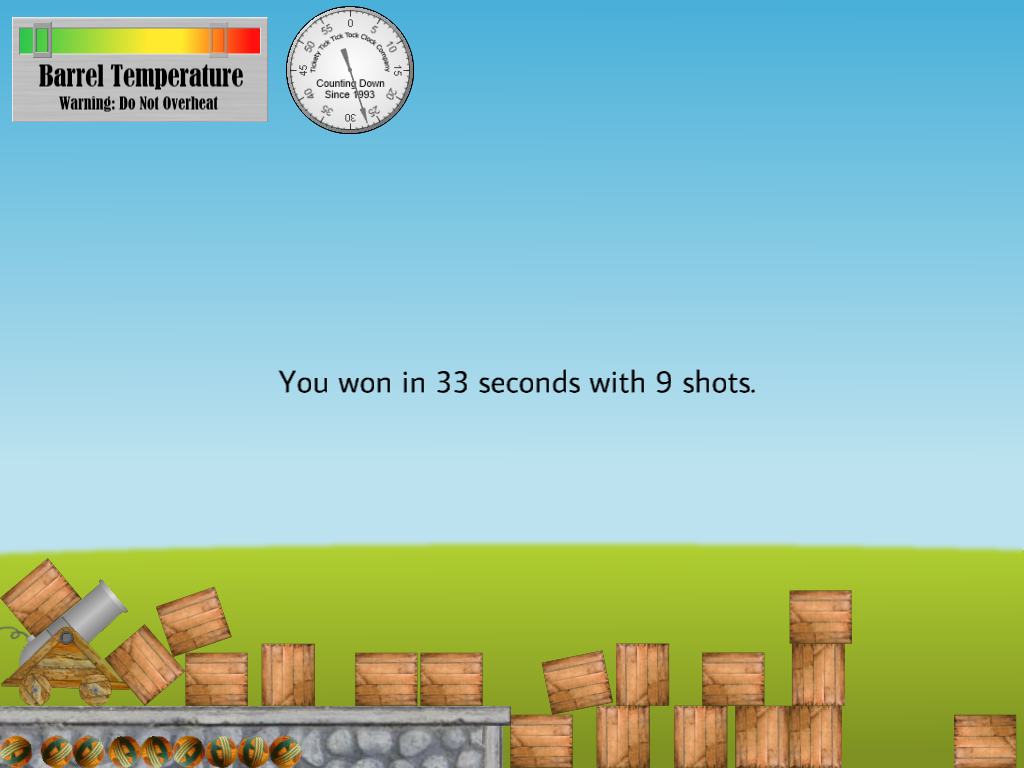
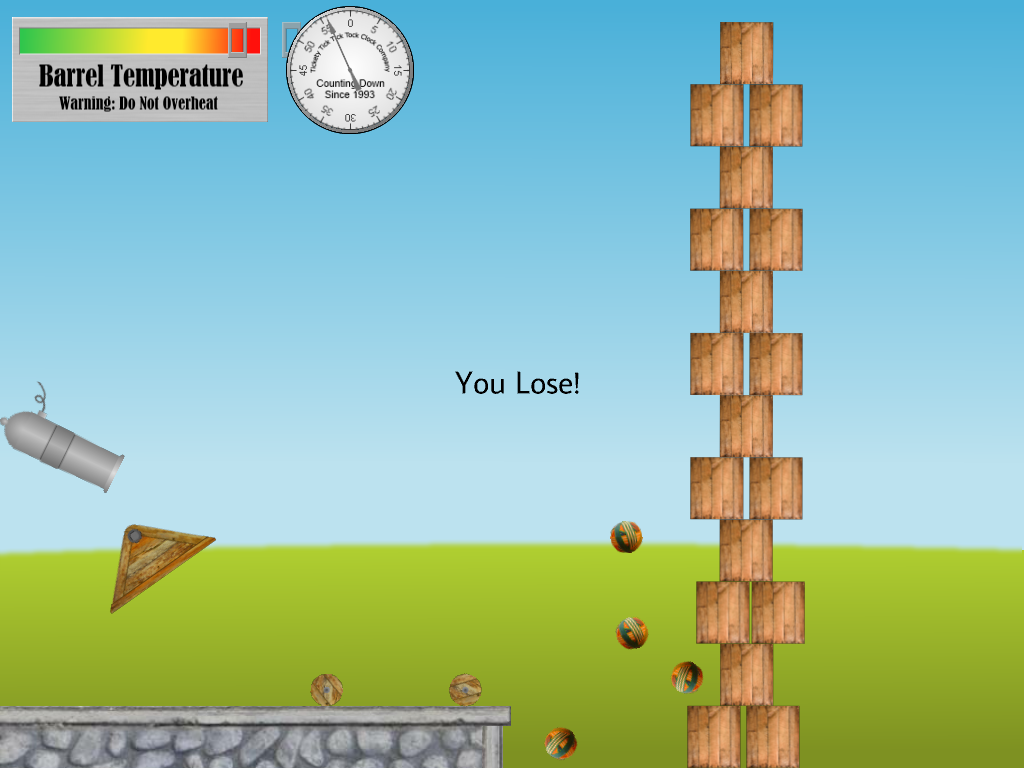
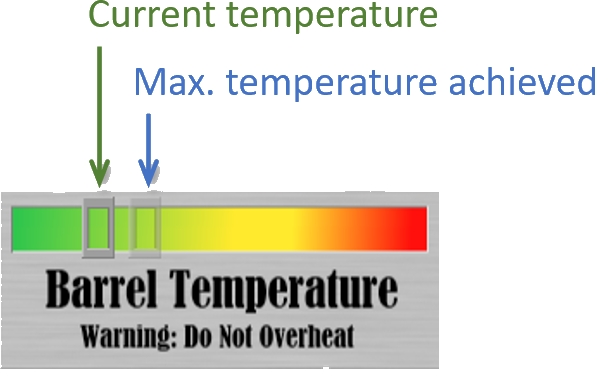
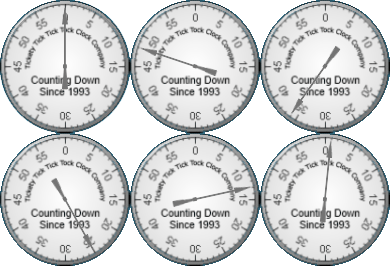
You must get all of the crates below a line approximately at the horizon to win. If you win, you'll see a text message telling you how many shots you used and how much time you took (see Fig. 2). There's a HUD at top left of the window with a gauge that tells you the cannon's current temperature and the maximum temperature experienced so far (see Fig. 4). Firing the cannon increases the temperature and it cools over the next few seconds. If the cannon overheats, then it will explode when next fired and you lose (see Fig. 3). You have 60 seconds in which to knock down the tower. There's a stopwatch to the right of the temperature gauge so you can see how much time is remaining.
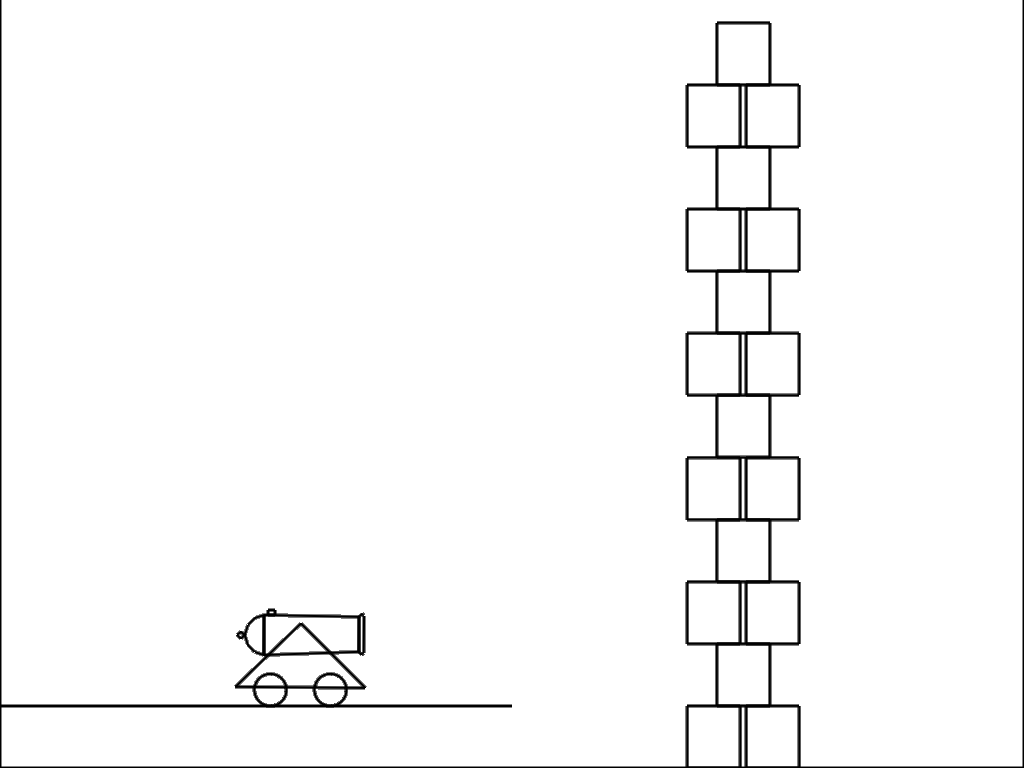
By now you should have enough experience with Box2D in the Box2D Bouncy Things Toy and the Box2D Joint Toy to understand most of the code in the Box2D Cannon Game, the shapes for which are shown in Fig. 6. Two interesting things remain, however, implementation of the cannon, and the generation of collision sounds (recall that neither the Box2D Bouncy Things Toy nor the Box2D Joint Toy had any audio. Each of these will be addressed in a separate section below.
The cannon is implemented in CCannon. The three most important cannon tasks are creating it, firing it, and making it explode. Each of these is covered in a separate subsection below.
The objects, physics bodies, and joints that make up the cannon are created in the CCannon constructor CCannon::CCannon. The cannon consists of four objects, a triangular base, a polygonal barrel, and two wheels (see, for example, Fig. 1, Fig. 3, and Fig. 6). The barrel is attached to the top of the triangular base using a revolute joint. The wheels are attached to the bottom of the base using wheel joints.
The constructor creates the cannon base by calling CCannon::CreateBase, which returns a pointer to the cannon base body in Box2D that the constructor then saves in CCannon::m_pBase. It then calls CCannon::CreateBarrel, which returns a pointer to the cannon barrel body in Box2D that the constructor then saves in CCannon::m_pBarrel. Next, it calls CCannon::CreateWheel twice, once for each wheel, saving the pointers to the Box2D bodies returned in CCannon::m_pWheel1 and CCannon::m_pWheel2.
Each of the functions CCannon::CreateBase, CCannon::CreateBarrel, and CCannon::CreateWheel take three parameters, the horizontal and vertical coordinates of the physics bodies in world space, and a collision index. The base and the barrel shapes are b2PolygonShapes, which we have no met before, and the wheel shapes are are of course b2CircleShapes which we have. For example, to create the triangle shape for the base shown in Fig. 6 we declare the following array of vertices, where w2 and h2 are, respectively, half the width and half the height of the triangle sprite:
b2Vec2 vertices[3];
vertices[0].Set(-w2, -h2);
vertices[1].Set(w2, -h2);
vertices[2].Set(0.0f, h2);
and we create the b2PolygonShape as follows:
b2PolygonShape shape;
shape.Set(vertices, 3);
The collision index parameter mentioned above is used to set the fd.filter.groupIndex field the b2FixtureDef in each of CCannon::CreateBase, CCannon::CreateBarrel, and CCannon::CreateWheel. You will notice that this is always -42 in the constructor code. This ensures that all fixtures attached to Box2D bodies in this program that have this group index (in our case, only the cannon parts) cannot (because of the negative sign) collide with each other. We will revisit this in Section 5.1.3.
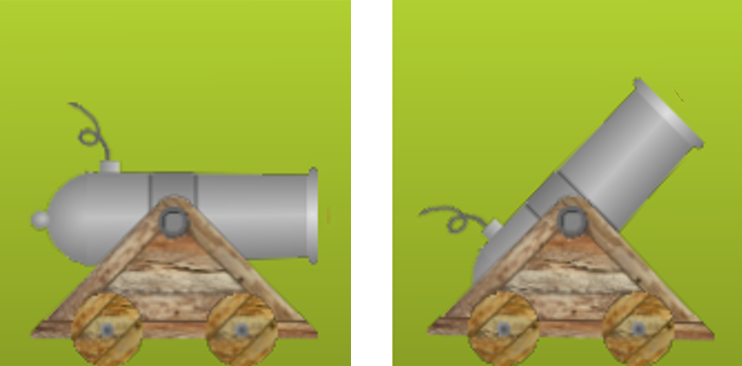
The constructor then creates a wheel joint for each wheel, saving pointers to them in CCannon::m_pWheelJoint1 and CCannon::m_pWheelJoint1. This process should already be familiar to you from the car in the Box2D Joint Toy. Next it creates a revolute joint between the cannon case and barrel. The process of creating a revolute joint should be familiar to you from the and the the windmill in the Box2D Joint Toy. However, we want the barrel to be restricted to pointing horizontally to the right or upwards at a maximum angle of \(45^\circ\) as shown in Fig. 7. This is achieved by setting the hitherto unused lowerAngle field of the instance of b2RevoluteJointDef used to create the revolute joint to -b2_pi/4.0f and the upperAngle field to 0.0f, not forgetting to also set enableLimit to true to activate them.
Lastly, the CCannon constructor creates the objects for the cannon parts with the appropriate sprites and pointers to Box2D bodies.
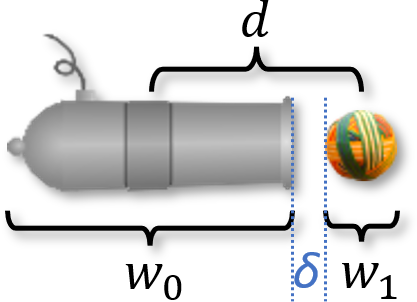
To fire a cannonball means creating one a short distance away from the muzzle of the cannon and giving it an impulse in the direction that the muzzle is facing. For example, if the cannon is pointing horizontally to the right, the cannon barrel has width \(w_0\), the cannonball has width \(w_1\), and we wish it to be created a small non-zero distance \(\delta\) in front of the cannon muzzle as shown in Fig. 8, then the center of the cannonball must be created at horizontal distance \((w_0 + w_1)/2 + \delta\) from the center of the cannon barrel and given a horizontal impulse.
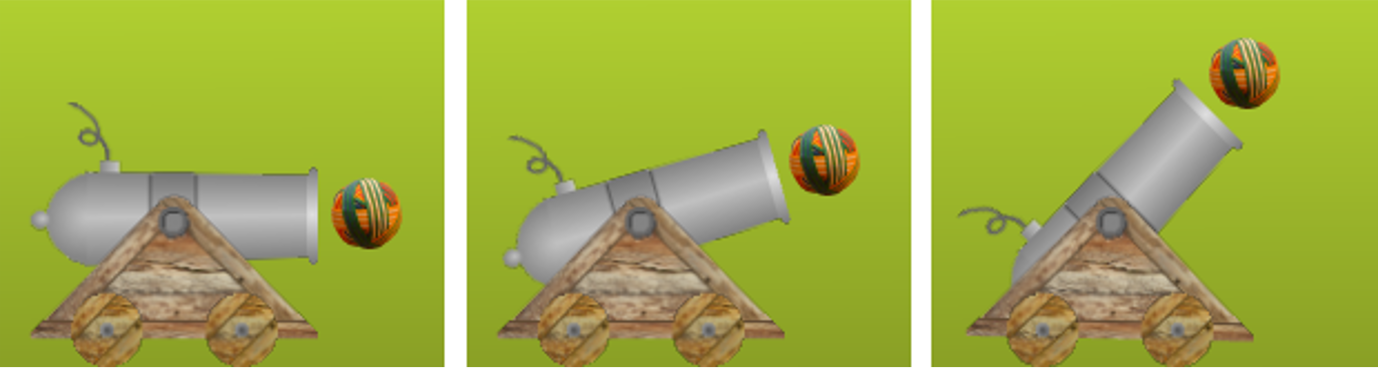
If the cannon barrel is rotated, then the vector from the center of the cannon barrel to the center of the cannonball must be rotated by the same amount as shown in Fig. 9. The impulse given to the cannonball must be in the direction of this vector.
When the player indicates that they want to fire the cannon by depressing the space bar (see Section 2), CGame::KeyboardHandler calls CCannon::Fire, which uses an instance of b2BodyDef to create a body for the cannonball object as follows:
b2BodyDef bd;
bd.type = b2_dynamicBody;
b2Vec2 v = m_pBarrel->GetPosition() +
  b2Mul(b2Rot(m_pBarrel->GetAngle()), b2Vec2(RW2PW(w + 4), 0.0f));
bd.position.Set(v.x, v.y);
Here, b2Vec2(RW2PW(w + 4), 0.0f) is the horizontal vector from the center of the barrel to the center of the cannonball, where w is half the width of the barrel plus half the width of the cannonball and \(\delta\) is \(4\) in Fig.8. Then,
b2Rot(m_pBarrel->GetAngle()), b2Vec2(RW2PW(w + 4), 0.0f)
describes the rotation of this vector by the barrel's angle which is obtained by calling m_pBarrel->GetAngle()). The call to b2Mul applies that rotation to that vector, which is added to the cannon barrel's position obtained by calling m_pBarrel->GetPosition() to give the initial position of the cannonball in Physics World which is stored temporarily in local variable v and used to set the cannonball body's initial position by calling bd.position.Set(v.x, v.y).
The impulse to the cannonball from the launch is applied to the cannonball body using b2Body::ApplyLinearImpulse, and an impulse in the opposite direction is applied to the cannon barrel to make the cannon recoil.
As mentioned in Section 4, we need to make the cannon explode in interesting ways. This is achieved by breaking the joints between the bodies that make up the cannon and giving them random impulses so that they fly across the screen as shown in Fig. 3. This is implemented in CCannon::Explode, which first makes the cannon bodies able to collide with each other by calling CCannon::MakeCollide for each body, which sets the group index for every fixture attached to the body (in principle there may be more that one) to zero. Supper b points to an instance of b2Body. Then,
b2Filter f = b->GetFixtureList()->GetFilterData();
gets b's collision filter data into f,
f.groupIndex = 0;
sets its group index to 0 so that it can collide with all other fixtures with group index 0 (i.e. those attached to cannon bodies), and
b->GetFixtureList()->SetFilterData(f);
loads the updated filter data from f back into the body pointed to by b. The joints are destroyed by calling
m_pPhysicsWorld->DestroyJoint(m_pWheelJoint1);
m_pPhysicsWorld->DestroyJoint(m_pWheelJoint2);
m_pPhysicsWorld->DestroyJoint(m_pBarrelJoint);
and impulses are applied to the cannon bodies using b2Body::ApplyLinearImpulse much in the same way as impulses were applied to the cannonball and cannon barrel above.
The sounds made by objects colliding in this game are totally kluged. We will see a better way of doing this in the Box2D Cannon Game With Stars. In the current game CObject::MakeCollisionSound is called once per object per animation frame. This function gets the object's current velocity by calling its body's GetLinearVelocityFromWorldPoint(b2Vec2(0, 0)) function and comparing it to its velocity in the previous frame which was stored in CObject::m_b2vOldV. If the difference between these vectors has "large enough" magnitude, then a collision sound is played. Currently the cannon barrel makes a clang when colliding with anything and everything else makes a thump when colliding with anything. Finer control over which objects make what sounds when colliding with which objects is possible here but we will put it off until the Box2D Cannon Game With Stars.
For the following problems you can either work directly in the folder 9. Box2D Cannon Game in your copy of the sage-physics repository, or (recommended) make a copy of the folder 9. Box2D Cannon Game in some place convenient (for example, the Desktop or your Documents folder) and work there.
In CGame::ProcessState, comment out the call to CGame::ProcessWinLose so that you have time to experiment with the game.
In the CCannon constructor CCannon::CCannon, disable the limits on the revolute joint between the cannon barrel and the base so that the cannon can point vertically downwards.
In CCannon::Fire, comment out the cannon temperature change so that the cannon won't overheat.
In CCannon::Fire, disable the cannon explosion when the barrel is pointing at the ground.
CCannon::Fire, increase the amount of recoil by a factor of four. Next, take a look at the Box2D Cannon Game With Stars.
 1.12.0