 |
Box2D Cannon Game With Stars
Game Physics with a 2D Physics Engine
|
|
Box2D Cannon Game With Stars
Game Physics with a 2D Physics Engine
|
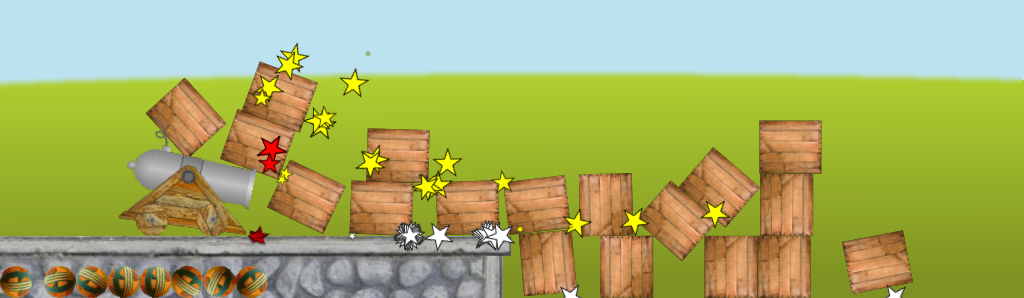
This version of the Box2D Cannon Game uses a Box2D contact listener to play the right collision sounds and animate colored stars at the points of contact. The stars remain fixed in world space at the point of first collision, and grow and shrink again over time. The color of each star is determined by the type of the objects colliding. An example snapshot can be seen in Fig. 1.
The remainder of this page is divided into five sections. Section 2 lists the controls and their corresponding actions, Section 3 tells you how to build it, Section 4 gives you a list of actions to take in the game to see some of its important features, Section 5 gives a breakdown of the code, and Section 6 addresses the question "what next?".
| Help (this document) | |
| Toggle draw mode from "sprites only", to "sprites and lines", to "lines only" | |
| Restart when over | |
| Fire cannon | |
| Rotate cannon barrel up while key is depressed | |
| Rotate cannon barrel down while key is depressed | |
| Start cannon moving left | |
| Start cannon moving right | |
| Stop cannon | |
| Save screenshot to a PNG file | |
| Quit game and close the window |
This code uses SAGE and Box2D. Make sure that you have followed the SAGE Installation Instructions and the Box2D Installation Instructions. Navigate to the folder 10. Box2D Cannon Game with Stars in your copy of the sage-physics repository. Run checkenv.bat to verify that you have set the environment variables correctly. Open Box2D Cannon Game with Stars.sln with Visual Studio and build the Release configuration. Alternatively, run Build.bat to build both Release and Debug configurations.
The same as Box2D Cannon Game but pay attention to the stars and the sounds.
The code for this game is almost identical to that of the Box2D Cannon Game except that the kluged code for playing collision sounds has been removed and code for a Box2D contact listener has been added. In order to use a Box2D contact listener you must derive a class from b2ContactListener and override its PreSolve function
void PreSolve(b2Contact*, const b2Manifold*);
which will be called by Box2D once per physics iteration after collisions (called contacts in Box2D) have been calculated. Our contact listener is called CMyListener. The first parameter of CMyListener::PreSolve is a pointer to a contact, which contains information about the fixtures involved in the collision. The second parameter of CMyListener::PreSolve is a pointer to a contact manifold, which contains information about the collision itself. Our parameters are named as follows:
void CMyListener::PreSolve(b2Contact* pContact, const b2Manifold* pManifold);
Getting the information that we need to play sounds and place stars (mainly the coordinates of the point or points of contact, the types of the objects colliding, and the speed of collision) is a little obscure. Keep in mind that in the code described below, that we will follow Box2D's convention of referring to the fixtures, bodies, and objects colliding as fixture/body/object A, and fixture/body/object B.
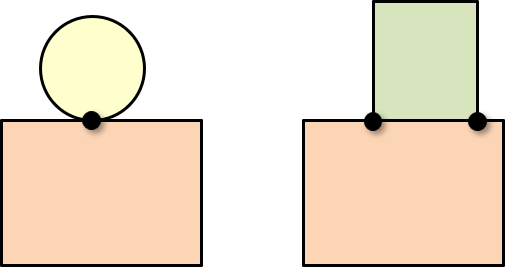
Note that in Box2D there can be either one point of contact (for example, a circle colliding with a polygon as in Fig. 2, left) or two points of contact (for example, a polygon edge colliding with a polygon edge as in Fig. 2, right).
The first thing you need to do is convert the b2Manifold to an instance of b2WorldManifold, which has the coordinates of the contacts in world space.
b2WorldManifold wm;
pContact->GetWorldManifold(&wm);
Next, you need to get the point_state of the contact point or points, a member of an enumerated type b2PointState that can be one of four values: b2_nullState (point not in use). b2_addState (collision point is new) b2_persistState (collision point was previously reported) b2_removeState (previously reported collision point has been removed). We declare two local variables to hold these point states. There are two variables because we will need one for the point states before the collision and one for the point state after it. We will call these state1 and state2, respectively. Both local variables need to be an array of size two, with one entry for each possible contact point. We get these values by calling b2GetPointStates as follows.
b2PointState state1[2], state2[2];
b2GetPointStates(state1, state2, pManifold, pContact->GetManifold());
Note that the point states in state1 are either b2_persistState, b2_removeState, or b2_nullState; whereas the point states in state2 are either b2_persistState, b2_addState, or b2_nullState. When we see a point state of b2_addState in state2, we are ready to make a sound and create a star particle. The contact point in Physics World Space is wm.points[0]. That's the point at which we will play the sound and create the star in Render World space. We can get pointers to the colliding bodies by calling
m_pBodyA = pContact->GetFixtureA()->GetBody();
m_pBodyB = pContact->GetFixtureB()->GetBody();
The velocity of the first body is obtained by calling
m_pBodyA->GetLinearVelocityFromWorldPoint(p);
where p is an arbitrary point (and similarly for the second body). The speed of collision, which is used to set the sound volume for the collision sounds, is then the magnitude of the difference between these vectors multiplied by a scale factor.
We also need to get the sprite type eSprite of each colliding body so that we can change the sound emitted and the color of the star depending on what type of objects are colliding. This seems impossible at first since this code is being executed by Box2D, which is a precompiled library that has no idea about your code for types and classes. Fortunately, Box2D has a provision for this. The Box2D body class m_userData has a field m_userData of type b2BodyUserData, which has a single field pointer of type uintptr_t, which is an unsigned 64-bit integer. We can use this to store a pointer to a newly created object in the Box2D body as follows. Suppose t is of type eSprite and p is a pointer to its b2Body. To create the object, call
CObject* pObj = new CObject(t, p);
The user data field in the body pointed to by p is set to pObj as follows:
p->GetUserData().pointer = (uintptr_t)pObj;
Returning to the contact listener code, we get a pointer to the object of body A by calling b2Body::GetUserData and type-casting the pointer field back to a pointer to CObject.
CObject* objA = (CObject*)m_pBodyA->GetUserData().pointer;
I hope I don't have to explain to you how dangerous this is. After all, a bug in your code could set the user data field to just about any garbage, resulting in a bad pointer when it is cast to CObject*. All I can see is be_careful when doing this. We can get the sprite type of body A by calling CObject::GetSpriteType.
We now have all the information that we need to play collision sounds and create stars at the contact points, keeping in mind that the pair of colliding objects can be in any order. To make a particular sound when a ball collides with anything, you must allow for the possibility that object A is the ball (and object B is not), and object B is the ball (and object A is not).
Next, take a look at the Box2D Blank Game.
 1.12.0