 |
Box2D Binary Counter
Game Physics with a 2D Physics Engine
|
|
Box2D Binary Counter
Game Physics with a 2D Physics Engine
|
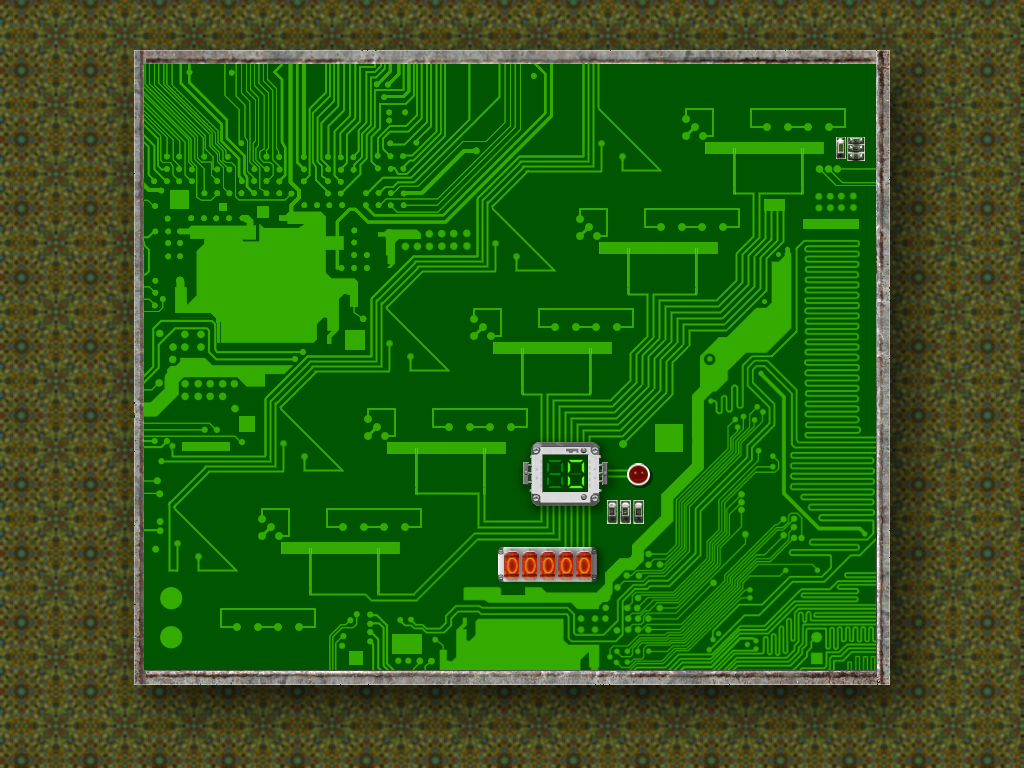
This toy uses Box2D to implement a 5-bit gravity-driven ripple-carry counter that counts from zero to \(2^5 - 1 = 31\). There is an LED readout for the number of balls released and an array of nixie tubes showing that number in binary. It takes a few seconds for the carry to ripple down after the release of a new ball, after which the current binary number represented by the soccer balls is read aloud and the corresponding soccer balls (or lack of them) highlighted by a spinning reticle. Fig. 1 shows the counter in its initial state, that is, at value zero.
The remainder of this page is divided into six sections. Section 2 lists the controls and their corresponding actions, Section 3 tells you how to build it, Section 4 gives you a list of actions to take in the game to see some of its important features, Section 5 gives a breakdown of the code, Section 6 contains some programming problems, and Section 7 addresses the question "what next?".
| Help (this document) | |
| Toggle draw mode from "sprites only", to "sprites and lines", to "lines only" | |
| Reset | |
| Release the next ball to increment the counter | |
| Save screenshot to a file | |
| Quit game and close the window |
This code uses SAGE and Box2D. Make sure that you have followed the SAGE Installation Instructions and the Box2D Installation Instructions. Navigate to the folder 13. Binary Counter Toy in your copy of the sage-physics repository. Run checkenv.bat to verify that you have set the environment variables correctly. Open Binary Counter Toy.sln with Visual Studio and build the Release configuration. Alternatively, run Build.bat to build both Release and Debug configurations.

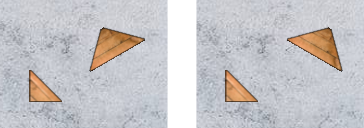
The key to this toy is the single-bit counter shown in Fig. 2. Bits that are 1 are represented by soccer balls. Bits that are zero are represented by the lack of a soccer ball. For example, the image on the left of Fig. 2 represents a 0, and the image on the right of Fig. 2 represents a 1.
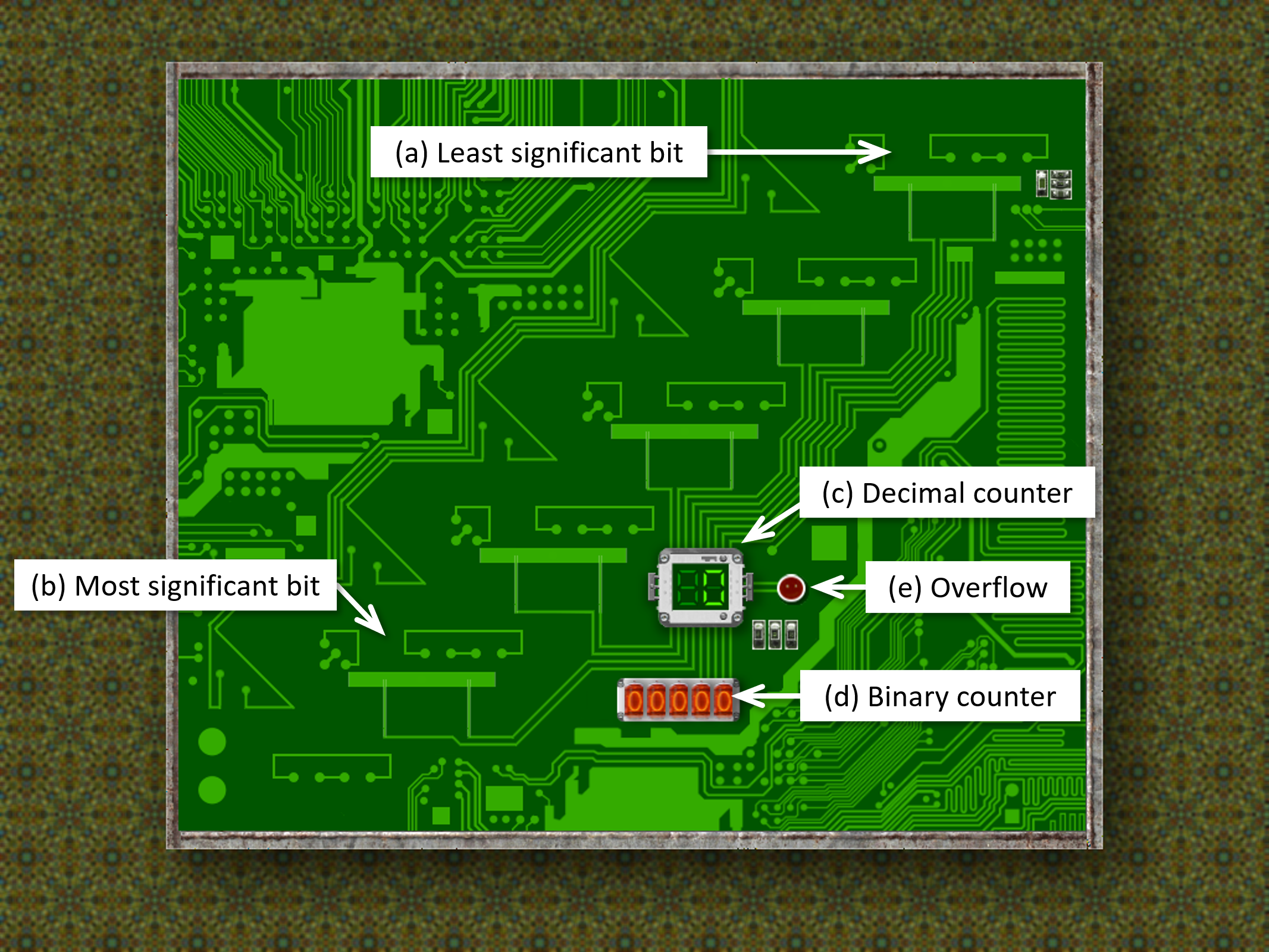
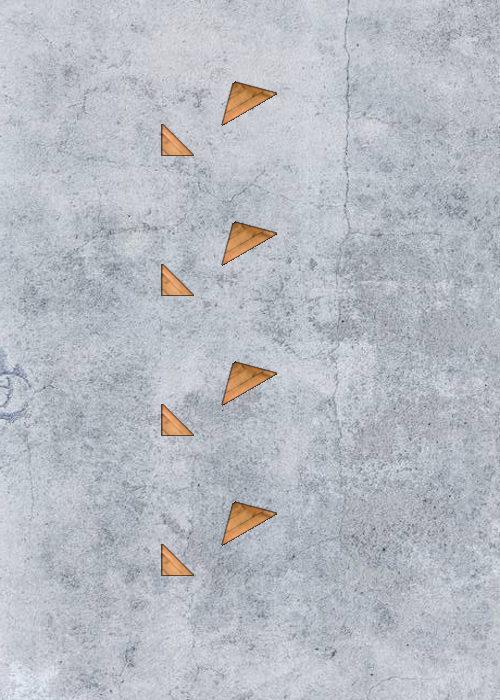
Fig. 3 shows the parts of the binary counter toy. There are five bits, which means that the counter can count from zero to \(2^5 - 1 = 31\). Each bit is represented by a copy of the device from Fig. 2 (left). arranged from right to left, top to bottom. That means that the least significant bit (the one representing \(2^0=1\)) is at top right (Fig. 3(a)) and the most significant bit (representing \(2^4 = 16\)) is at bottom left (Fig. 3(b)). The current value of the counter can be read off from right to left using the soccer balls in binary, from left to right in the binary counter display (Fig. 3(c)), and in decimal in the binary counter display (see Fig. 3(d)). Any attempt to count to \(32\) will result in the overflow light (see Fig. 3(e)) flashing red.
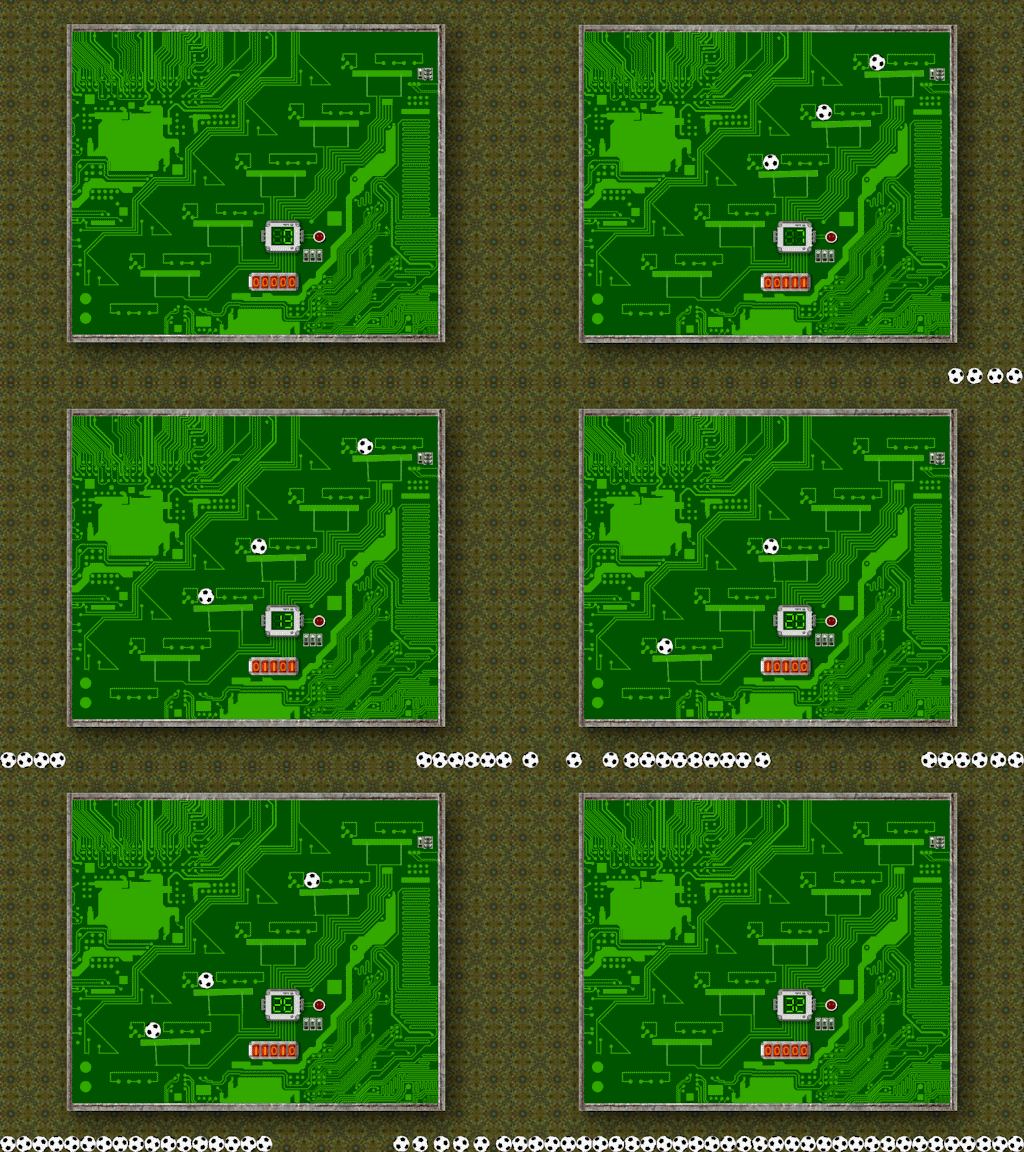
Fig. 4 shows an animation of the rest states, that is, the screen shown when the balls have come to rest and the game is waiting for the user to release the next ball (see Section 2 for keyboard controls). Pay attention to the soccer balls, the binary counter, and the decimal counter (refer back to Fig. 3 is necessary). Let's look a little closer at what happens to a single bit when incrementing from 0 to 1, then incrementing from 1 to 0 resulting in a carry bit. This is shown in Fig. 5.
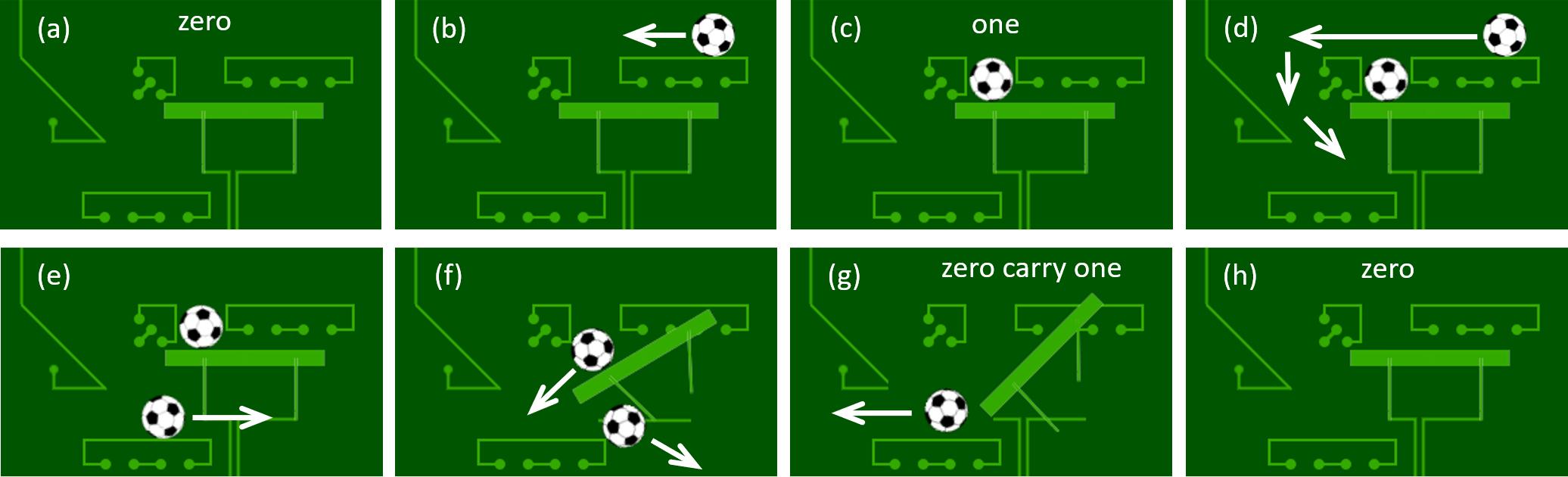
Fig 5(a) shows a single zero bit. When a ball is released (either a carry from the previous bit or, if it's the least significant bit, then from the top of window when the user hits the increment key as described in Section 2), it falls onto the top right platform and rolls right as shown in Fig 5(b) and gets trapped in the pit shown in Fig 5(c). The bit has now been incremented from 0 to 1. Now we show what happens when we increment from 1 to 0. The next ball again enters from top right, but this time it rolls over the ball in the pit and down the slope on the left of Fig 5(d). It hits the lower platform in Fig 5(e) and rolls right, having been deflected by the slope. This ball hits the vertical leg holding up a swing arm at the bottom of the pit containing the previous ball and exits the toy to the right of Fig 5(f), ending up with a collection of balls at the bottom of the window. The previous ball is released in Fig 5(f) and rolls to the left in Fig 5(g) on the lower platform, which is in fact the upper platform of the next bit counter. This is the carry bit. Meanwhile, when released of the weight of the carry ball, the swing arm returns to its initial position in Fig 5(h).
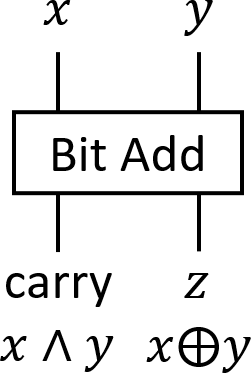
Let \(x\) and \(y\) be single bits. When \(x\) and \(y\) are added together, the result is the exclusive-or \(z = x \oplus y\) and the carry bit is the conjunction \(x \wedge y\). This gives us the single-bit counter shown in Fig. 6.
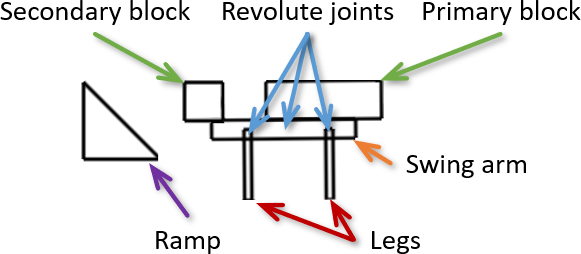
Our single bit counter consists of two rectangular blocks (primary and secondary), a triangular ramp, a rectangular swing arm, and two rectangular legs, and three revolute joints as shown in Fig. 7. There is a revolute joint at the center of the swing arm connecting it to the null background, and a revolute joint at the top of each leg joining it to one of the two ends of the swing arm. It is implemented in code by CBitCounter. Its constructor CBitCounter::CBitCounter takes as parameters the coordinates of its center in render world coordinates and a Boolean variable that is true if this is the last (i.e. null) bit counter. It uses CBitCounter::CreateRamp to create the ramp and CBitCounter::CreateBlock to create the blocks, swing arm, and legs.
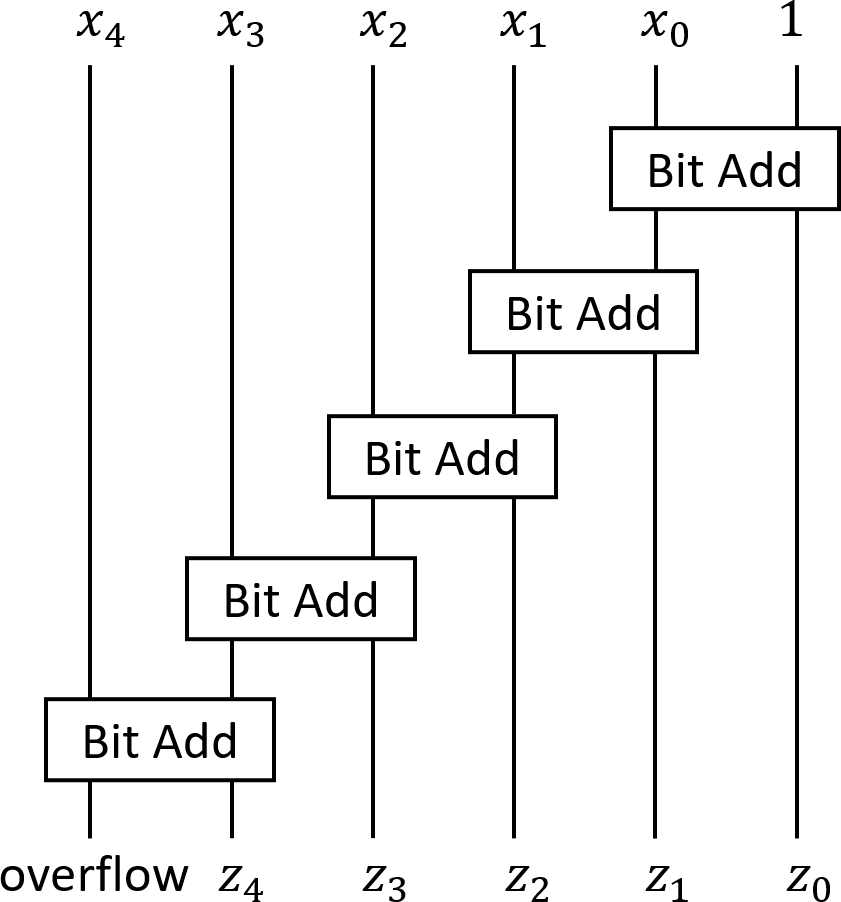
Now suppose we wish to increment the binary number \(x_4x_3x_2x_1x_0\) to get the result \(z_4z_3z_2z_1z_0\) and an overflow bit. We simply cascade five single bit counters with the carry from one going to the input of the next as shown in Fig. 8. This should be familiar to you if you have taken an elementary hardware or computer organization class.
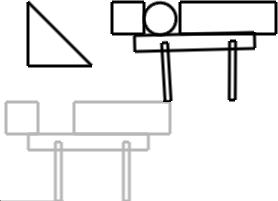
Our ripple-carry increment will be constructed from five single-bit counters as shown in Fig. 7 spaced out vertically and shifted to the left so that the carry from one becomes the input to the next. Its left leg will rest on the primary block of the single bit counter below it so that the ball can rest on it when the it has value 1 as shown in Fig. 9. There will be a sixth sentinel single bit counter that consists of just the primary block.
Our counter is implemented as an instance of CCounter, which stores an array of pointers to instances of CBitCounter created in its constructor. An instance of CCounter is created in CObjectManager::CreateCounter which is called from CGame::BeginGame.
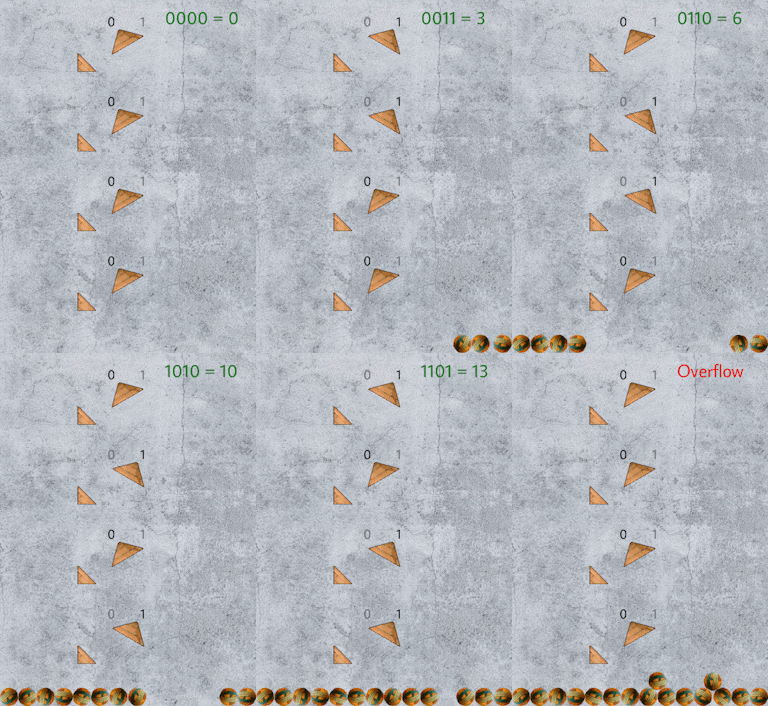
11. Box2D Blank Game in some place convenient (for example, the Desktop or your Documents folder) and modify it so that a ball is dropped from the top center of the window when the Space bar is pressed. Each ball cascades off the gadgets and collects at the bottom of the window having incremented the binary number represented by the gadgets from bottom to top. Fig. 12 shows the rest states representing the 4-bit binary numbers.Next, take a look at the Cannon Lullaby Toy.
 1.12.0