 |
SAGE
A Simple Academic Game Engine
|
Loading...
Searching...
No Matches
|
SAGE
A Simple Academic Game Engine
|
The window class. More...
#include <SageWindow.h>
Public Member Functions | |
| template<typename t0 , typename t1 , typename t2 > | |
| int | WinMain (_In_ HINSTANCE, bool, const t0 &, const t1 &, const t2 &) |
| WinMain. | |
 Public Member Functions inherited from Sage::CSettingsManager Public Member Functions inherited from Sage::CSettingsManager | |
| void | Load () |
| Load game settings. | |
Protected Member Functions | |
| HWND | CreateGameWindow (HINSTANCE) |
| Create default window. | |
| bool | InitGameWindow (_In_ HINSTANCE) |
| Initialize the game window. | |
| void | OpenDebugConsole () |
| Open debug console window. | |
| void | CloseDebugConsole () |
| Close debug console window. | |
| Protected Member Functions inherited from Sage::CSettingsManager | |
| void | SetWinSize (int, int) |
| Set window size information. | |
Static Protected Member Functions | |
| static LRESULT CALLBACK | WndProc (HWND, UINT, WPARAM, LPARAM) |
| The Window Procedure. | |
| static void | GetBorderSizes (int &w, int &h) |
| Get window border width and height. | |
| static void | EnforceAspectRatio (WPARAM, RECT *) |
| Enforce aspect ratio. | |
| static void | EnforceAspectRatio (MINMAXINFO *) |
| Enforce aspect ratio. | |
Static Protected Attributes | |
| static Vector2 | m_vMousePos |
| Mouse position. | |
| Static Protected Attributes inherited from Sage::CWindowDesc | |
| static HWND | m_Hwnd = 0 |
| Window handle. | |
| static HINSTANCE | m_hInst = 0 |
| Instance handle. | |
| static bool | m_bExitSizeMove = true |
| User just finished moving/resizing window. | |
| Static Protected Attributes inherited from Sage::CSettingsManager | |
| static tinyxml2::XMLElement * | m_pXmlSettings = nullptr |
| Pointer to the settings tag in the XML settings file. | |
| static float | m_fAspectRatio = 1.0f |
| Aspect ratio, width/ht. | |
| Static Protected Attributes inherited from Sage::CSettings | |
| static char | m_szName [MAX_PATH] |
| Name of this game. | |
| static int | m_nWinWidth = 0 |
| Window width in pixels. | |
| static int | m_nWinHeight = 0 |
| Window height in pixels. | |
| static Vector2 | m_vWinCenter = Vector2::Zero |
| Window center. | |
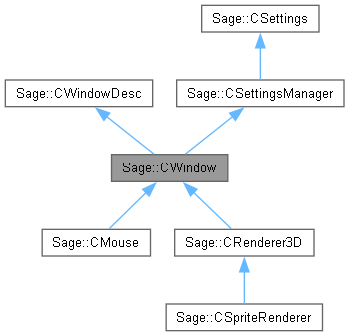
CWindow handles Windows specific things. This will help you to keep the rest of your code as OS-independent as possible. Gnarly things that it handles includes making a window whose client area is a specific width and height, and making sure that the window maintains its aspect ratio if the user is brave enough to resize it by dragging on one of the window's edges or corners.
|
protected |
Delay closing the console window so that the user can read any debug messages that might have occurred while closing the game. This function should be one of the last functions called before exiting.

|
protected |
Register and create a window. Care is taken to ensure that the client area of the window is the right size, because the default way of creating a window has you specify the width and height including the frame.
| h | instance handle. |


|
staticprotected |
Enforce the aspect ratio in response to a WM_GETMINMAXINFO message. This function ensures that when the window is bigger than the screen, then it has the correct aspect ratio when Windows automatically resizes it.
| pmmi | [OUT] Pointer to a MINMAXINFO structure. |

|
staticprotected |
Force the aspect ratio of the client area of the window in response to a WM_SIZING message. This function resizes the drag rectangle provided by the WM_SIZING message.
| wParam | WMSZ message telling us which edge is being dragged on. |
| pRect | [IN, OUT] Pointer to drag rectangle. |


|
staticprotected |
Get the combined width and height of the borders on the window. Combined width is the sum of the widths of the left and right borders. Combined height is the sum of the heights of the top and bottom borders.
| w | [OUT] Combined border width. |
| h | [OUT] Combined border height. |

|
protected |
Create and initialize the game window.
| hInstance | Handle to the current instance of this application. |


|
protected |
Open a console window and redirect stdout, stderr and stdin to it so that can be used for debug output using printf.

| int Sage::CWindow::WinMain | ( | _In_ HINSTANCE | hInst, |
| bool | console, | ||
| const t0 & | InitFn, | ||
| const t1 & | UpdateFn, | ||
| const t2 & | CloseFn ) |
Do setup, maintain a message pump that does game animation whenever there's no message waiting, and exit the message pump on WM_QUIT. Then do cleanup and exit the application.
| t0 | Type of initialization function. |
| t1 | Type of update function. |
| t2 | Type of close function. |
| hInst | Handle to window instance. |
| console | True if a console debug window is wanted. |
| InitFn | Initialization function. |
| UpdateFn | Update function. |
| CloseFn | Close function. |

|
staticprotected |
Default window procedure.
This is the handler for messages from the operating system.
| h | Window handle. |
| m | Message code. |
| wp | Parameter for message. |
| lp | Second parameter for message. |


 1.12.0