 |
Box2D Joint Toy
Game Physics with a 2D Physics Engine
|
Loading...
Searching...
No Matches
|
Box2D Joint Toy
Game Physics with a 2D Physics Engine
|
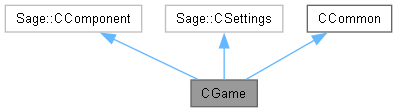
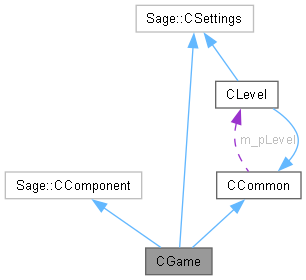
The game class. More...
#include <Game.h>
Public Member Functions | |
| ~CGame () | |
| Destructor. | |
| void | Initialize () |
| Initialize the game. | |
| void | ProcessFrame () |
| Process an animation frame. | |
| void | Release () |
| Release the renderer. | |
Private Member Functions | |
| void | LoadSprites () |
| Start loading sprites. | |
| void | BeginGame () |
| Begin playing the game. | |
| void | KeyboardHandler () |
| The keyboard handler. | |
| void | RenderFrame () |
| Render an animation frame. | |
| void | ProcessState () |
| Process game state. | |
| void | CreateLevel () |
| Create current level. | |
Private Attributes | |
| eGameState | m_eGameState = eGameState::Loading |
| Game state. | |
Additional Inherited Members | |
 Static Protected Attributes inherited from CCommon Static Protected Attributes inherited from CCommon | |
| static b2World * | m_pPhysicsWorld = nullptr |
| Pointer to Box2D Physics World. | |
| static CBox2DRenderer * | m_pRenderer = nullptr |
| Pointer to the renderer. | |
| static CLevel * | m_pLevel = nullptr |
| Pointer to current level. | |
| static eLevel | m_eCurLevel = eLevel::Windmill |
| Current level. | |
| static eDrawMode | m_eDrawMode = eDrawMode::Sprites |
| Draw mode. | |
The game class is the object-oriented implementation of the game. This class must contain the following public member functions. Initialize() does initialization and will be run exactly once at the start of the game. ProcessFrame() will be called once per frame to create and render the next animation frame. Release() will be called at game exit but before any destructors are run.
| CGame::~CGame | ( | ) |
Delete the current level and physics world.
|
private |
Create the first level and set game state to playing.


|
private |
Create the current level.

| void CGame::Initialize | ( | ) |
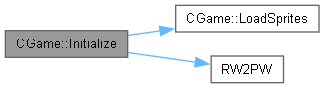
Set the timer to a fixed time step. Create the renderer and load images. Create physics world.

|
private |
Poll the keyboard state and respond to the key presses that happened since the last frame.


|
private |
Create a media list Sage::CMediaList of eSprite. For each sprite, insert into the media list a pair consisting of an instance of the sprite enumerated type eSprite and the corresponding string used in the name field in a <sprite> tag in GameSettings.xml. Pass the media list to the renderer for loading.

| void CGame::ProcessFrame | ( | ) |
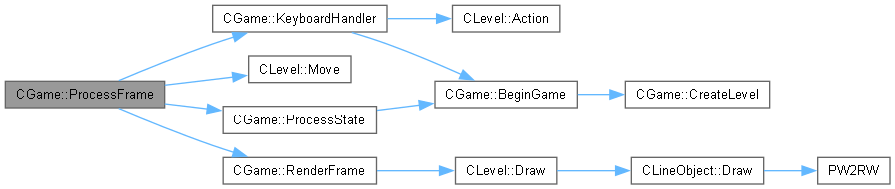
This function will be called regularly to process and render a frame of animation, which involves the following. Handle keyboard input. Move the game objects in physics world. Render a frame of animation. Process any changes to the current game state. There's also some extra processing to be done outside the physics in order to control the motion of the nautilus gears, the car, the pulleys, and the rack-and-pinion.

|
private |
Process any changes to the current game state. If the game is in state eGameState::Loading and both the renderer and sound manager have finished loading (which may or may not be multithreaded), then begin the game.


| void CGame::Release | ( | ) |
Release all of the DirectX12 objects by deleting the renderer.

|
private |
Draw the game objects. The renderer is notified of the start and end of the frame so that it can let Direct3D do its pipelining jiggery-pokery. If the game state indicates that media is still loading, then a Loading... string is drawn at the center of the screen. This function assumes that the font specified in GameSettings.xml has already been loaded. If all media has finished loading, then the game objects are drawn by the level class.


 1.12.0